
Industrial systems are under attack. Cyberattacks on manufacturing, energy, and critical infrastructure have surged in recent years. Legacy protocols like Modbus and OPC Classic offer zero protection — data travels in plain text with no authentication.
OPC UA was designed to fix this. Security isn’t an add-on or a third-party patch. It’s built into the core of the standard, defined in IEC 62541 Part 2.
This guide explains how OPC UA security actually works, what threats it defends against, and what best practices you should follow when deploying it.
Table of Contents
Why OPC UA Security Matters
OPC UA operates at every level of industrial infrastructure — from process control on the plant floor to enterprise management connecting with customers and suppliers. As the IEC 62541 specification states, OPC UA may be an attractive target for industrial espionage or sabotage and may also be exposed to threats through untargeted malware circulating on public networks.
The consequences of a breach aren’t just data loss. In industrial environments, compromised communications can cause production shutdowns costing hundreds of thousands of dollars per hour, safety incidents that endanger workers and the public, environmental damage from uncontrolled processes, and intellectual property theft of proprietary manufacturing methods.
OPC UA’s predecessor, OPC Classic, relied on Microsoft DCOM — which was never designed for industrial security. DCOM authentication is hard to configure, offers no encryption, and has been a persistent source of vulnerabilities. OPC UA replaces all of that with a purpose-built security framework.
The Security Architecture: Three Layers
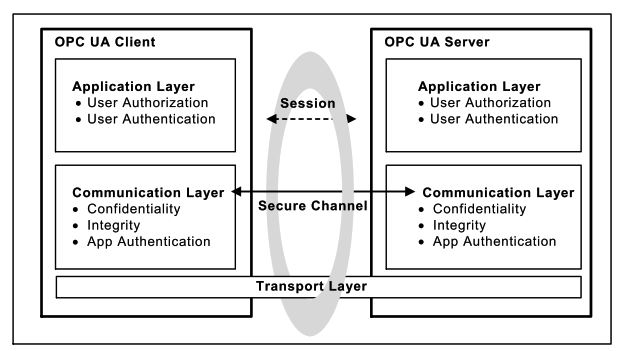
OPC UA security is structured in three distinct layers. Each layer handles different security objectives.
Layer 1: Transport Layer
The transport layer handles the physical transmission of data over the network. OPC UA can run over TCP, HTTPS, or WebSockets. This layer provides the basic network connection but relies on the communication layer above it for security.
If a transport connection drops (say, a network cable is unplugged), the communication layer can re-establish it without breaking the secure session above. This separation means network hiccups don’t force a full security re-negotiation.
Layer 2: Communication Layer (Secure Channel)
This is where the heavy lifting happens. The communication layer creates a Secure Channel between client and server. This channel provides three things: confidentiality through message encryption, integrity through message signing, and application authentication through digital certificates.
The Secure Channel works similarly to how TLS/SSL protects your web browser. When a client connects to a server, they exchange certificates, verify each other’s identity, negotiate encryption algorithms, and derive shared keys for encrypting all further communication.
These derived keys are changed periodically so that attackers don’t have unlimited time to try cracking them.
Layer 3: Application Layer (Session)
On top of the Secure Channel sits the Session. This is where user authentication and authorization happen. The session manages who the user is and what they’re allowed to do.
A session can survive the loss of its underlying Secure Channel. If the network drops momentarily, the client can re-establish the Secure Channel and resume the same session without losing state. This matters in industrial environments where brief network interruptions shouldn’t cause operators to log in again.
Security Modes
OPC UA defines three message security modes that determine how messages between client and server are protected.
| Security Mode | Signing | Encryption | Use Case |
|---|---|---|---|
| None | No | No | Testing and development only |
| Sign | Yes | No | Integrity protection where confidentiality isn’t needed |
| SignAndEncrypt | Yes | Yes | Full protection — required for production systems |
In None mode, messages travel without any cryptographic protection. This mode exists only for development and debugging. Never use it in production.
In Sign mode, every message carries a digital signature. This guarantees integrity — if anyone tampers with a message in transit, the signature check fails and the message is rejected. However, the message content is still readable to anyone sniffing the network.
In SignAndEncrypt mode, messages are both signed and encrypted. This provides full protection: integrity (no tampering) and confidentiality (no eavesdropping). The IEC 62541 standard recommends this mode for all industrial deployments.
The Six Security Objectives
The IEC 62541 Part 2 security model defines six core objectives that OPC UA is designed to achieve.
Authentication
Every entity in an OPC UA system must prove its identity. This happens at two levels. Application authentication verifies that the client software and server software are who they claim to be, using X.509 digital certificates. User authentication verifies that the human operator has valid credentials — whether that’s a username and password, a certificate, or another token.
Authorization
Once you’ve proven who you are, authorization controls what you’re allowed to do. OPC UA supports fine-grained access control — down to individual data points. An operator might have read-only access to production data, while an engineer has read-write access, and a maintenance technician can call specific methods. The server enforces these rules on every request.
Confidentiality
All data exchanged between client and server can be encrypted. This prevents eavesdropping — even if an attacker is sniffing network traffic, they see only encrypted noise. OPC UA uses industry-standard algorithms like AES for symmetric encryption and RSA or ECDSA for asymmetric operations.
Integrity
Digital signatures on every message guarantee that data hasn’t been tampered with during transmission. If even a single bit is changed, the signature check fails and the message is rejected. This protects against man-in-the-middle attacks where an attacker intercepts and modifies messages.
Auditability
OPC UA includes a built-in audit framework. Servers and clients generate audit records of connection attempts (successful and failed), security negotiation results, configuration changes, user interactions, and session rejections.
The standard provides traceability between client and server audit logs. When a client issues a request, it includes its local audit entry ID. The server logs this alongside its own record. An auditor can follow the chain from server back to client to reconstruct exactly what happened.
Availability
OPC UA includes protections against denial-of-service attacks. Message size limits, connection throttling, and timeout mechanisms help prevent attackers from overwhelming servers. While no protocol can fully prevent every DoS attack, OPC UA’s design minimizes the impact.
What Threats Does OPC UA Defend Against?
The IEC 62541 Part 2 specification identifies ten specific threat categories. Here’s what they are and how OPC UA handles them.
Message flooding — An attacker sends massive volumes of requests to overwhelm the server. OPC UA counters this with message size limits, request throttling, and session management that can reject unauthenticated floods before they consume resources.
Eavesdropping — An attacker captures network traffic to read sensitive data. OPC UA encrypts all communication on the Secure Channel, making captured traffic useless without the encryption keys.
Message spoofing — An attacker forges messages that appear to come from a legitimate client or server. Application certificates and message signatures make spoofing detectable.
Message alteration — An attacker intercepts messages and changes their content before forwarding them. Digital signatures on every message catch any modification.
Message replay — An attacker records valid messages and replays them later (like re-sending a “open valve” command at the wrong time). Sequence numbers and timestamps in OPC UA messages detect and reject replays.
Malformed messages — An attacker sends deliberately broken messages to crash the server or exploit parsing bugs. OPC UA’s specification requires strict input validation to reject invalid structures.
Server profiling — An attacker probes a server to identify its software and version, looking for known vulnerabilities. OPC UA minimizes the information revealed in error responses to make profiling harder.
Session hijacking — An attacker steals session credentials to take over an active connection. Encrypted Secure Channels and session tokens that are tied to the channel make hijacking extremely difficult.
Rogue servers — An attacker sets up a fake OPC UA server to trick clients into sending data. Application certificate validation lets clients verify they’re connecting to a legitimate server.
Compromised credentials — An attacker steals usernames, passwords, or certificates. OPC UA supports multiple authentication methods and certificate revocation lists (CRLs) to quickly invalidate stolen credentials.
How the Secure Channel Is Established
Understanding the handshake process helps you appreciate what’s happening under the hood.
First, the client calls the Discovery Service to learn what security policies the server supports and to retrieve the server’s digital certificate (which contains the server’s public key).
Next, the client sends an OpenSecureChannel request. This message includes the client’s own certificate and secret random data. The entire message is encrypted with the server’s public key and signed with the client’s private key.
The server decrypts the message with its private key and verifies the client’s signature. It then sends back its own secret random data in the response.
Both sides now combine their secret data to derive a shared set of symmetric encryption keys. From this point forward, all messages are encrypted and signed using these faster symmetric keys instead of the slower asymmetric ones.
These keys are rotated periodically — the standard requires regular renewal so attackers can’t accumulate enough encrypted traffic to crack the keys.
Certificate Infrastructure: The Foundation of Trust
OPC UA’s entire security model rests on X.509 digital certificates and Public Key Infrastructure (PKI). Understanding how certificates work is essential for anyone deploying OPC UA.
What’s in an OPC UA certificate
Every OPC UA application instance — whether client or server — has its own Application Instance Certificate. According to IEC 62541 Part 2, this certificate contains the application URI (a globally unique identifier), a public key, the certificate issuer’s identity, a validity period, and a digital signature from the issuer.
The certificate also has a corresponding private key that is kept secret. The public key can be shared freely; the private key must be protected at all costs. If the private key is compromised, the certificate can no longer be trusted and must be revoked and replaced.
CA-based certificate management
In larger industrial deployments, a company-specific Certificate Authority (CA) manages all certificates. The workflow is straightforward.

The administrator sets up a CA and generates a root certificate. When a new OPC UA client or server is installed, the CA issues an Application Instance Certificate for it. Only the CA’s public key needs to be installed in the trust list of every application. When any application connects, it validates the peer’s certificate against the CA trust chain.
This approach scales well. Adding a new server to the network means issuing one certificate from the CA — not manually copying keys to every existing client. When a certificate expires, you replace it in one place without touching every other system.
The IEC 62541 Part 2 standard specifically recommends using a company-specific CA rather than a commercial CA like VeriSign. The reason: with a commercial CA, you’d be trusting every certificate that CA has ever issued, not just your own applications. A company-specific CA keeps trust within your organization.
Manual certificate trust (self-signed)
For small installations — a handful of clients and servers — manual trust management with self-signed certificates can work. Each application generates its own self-signed certificate. An administrator exports the public key from each application and manually installs it into the trust list of every other application it needs to communicate with.
This works for small setups but becomes unmanageable as the system grows. As the standard points out, when you have multiple servers and clients, the administrator must copy every public key to every trust list. When any certificate expires and gets replaced, the entire process repeats. The administrative burden grows rapidly.
Trust lists and revocation
Every OPC UA application maintains a trust list — a list of certificates (or CAs) it accepts. When a connection request arrives, the application checks whether the remote certificate is in its trust list. If not, the connection is rejected.
Applications also check Certificate Revocation Lists (CRLs). If a certificate’s private key is compromised or the application is decommissioned, the CA adds that certificate to the CRL. Any application checking the CRL will then reject connections from the revoked certificate, even if it was previously trusted.
The standard requires that private keys be stored in protected certificate stores with access restricted to administrators and the application itself. Trust lists and CRLs must also be secured, allowing write access only to administrators.
Session authentication tokens
Once the Secure Channel is established and a session is created, the server issues a SessionAuthenticationToken — a unique identifier tied to that specific authenticated session. This token must be included in every subsequent service request.
This mechanism prevents session hijacking. Even if an attacker somehow intercepts a session ID, they can’t use it without the valid authentication token bound to the original Secure Channel. The token, the session, and the Secure Channel are all cryptographically linked together.
Security Policies and Profiles
OPC UA doesn’t lock you into one set of algorithms. Instead, it uses Security Policies — named configurations that specify which algorithms to use for signing, encryption, and key derivation.
A server announces which policies it supports through its Discovery Service. The client selects the strongest mutually supported policy before establishing communication. This flexibility means that as cryptographic algorithms age and become vulnerable, new policies with stronger algorithms can be adopted without redesigning the protocol.
Common security policies
| Security Policy | Encryption | Signature | Status |
|---|---|---|---|
| None | None | None | Testing only — never for production |
| Basic128Rsa15 | AES-128 | RSA-SHA1 | Legacy — deprecated, avoid |
| Basic256 | AES-256 | RSA-SHA1 | Older policy — being phased out |
| Basic256Sha256 | AES-256 | RSA-SHA256 | Modern — recommended minimum |
| Aes128_Sha256_RsaOaep | AES-128 | SHA-256 | Current standard |
| Aes256_Sha256_RsaPss | AES-256 | SHA-256 with RSA-PSS | Strongest current policy |
The IEC 62541 Part 7 specification defines standard Security Profiles that products are certified against. This ensures a baseline level of security across all conformant implementations.
Since computing power increases every year, the standard explicitly warns that algorithms considered secure today may become insecure in the future. It recommends designing applications so that cryptographic algorithms can be updated with little or no code changes. NIST and similar agencies publish guidance on expected algorithm lifetimes — review your selected policies against this guidance periodically.
User authentication methods
After the Secure Channel is established, the client creates a session and authenticates the user through the ActivateSession service. OPC UA supports four authentication methods.
Anonymous — no user credentials required. Should be disabled in production unless there’s a specific, justified reason.
Username and password — the most common method. Credentials are protected by the Secure Channel’s encryption.
X.509 certificate — the user presents a digital certificate. The server validates it using a challenge-response process: the server provides a nonce, and the client signs it with the user’s private key.
Kerberos / enterprise token — integration with enterprise authentication systems using WS-Security tokens.
Best Practices for Deployment
Having strong security built into the protocol is only half the battle. How you deploy and configure it determines whether you’re actually protected.
Never use “None” security in production
OPC UA allows a security mode of “None” for testing and development. Some deployments leave this enabled in production — which defeats the entire purpose. Always require at least “Sign” mode (integrity protection), and preferably “SignAndEncrypt” (integrity plus confidentiality).
Take certificate management seriously
OPC UA’s security depends on X.509 certificates. Poor certificate management is the most common way deployments go wrong. Use a proper Certificate Authority (CA) instead of self-signed certificates in production. Establish a process for certificate creation, distribution, renewal, and revocation. Set reasonable certificate lifetimes — not 99 years. Check Certificate Revocation Lists (CRLs) regularly. Don’t auto-trust every certificate that connects. Review and explicitly approve each one.
Apply least-privilege access
Every user should have only the permissions they need — nothing more. OPC UA supports fine-grained authorization down to individual nodes. Use it. An operator reading production data doesn’t need write access to setpoints. A reporting system doesn’t need access to safety-critical parameters.
Enable audit logging
Turn on OPC UA’s audit features and make sure the logs are stored securely. These logs are your forensic trail if something goes wrong. They’re also required by many compliance frameworks. Protect audit logs from unauthorized tampering — if an attacker can delete the logs, they can cover their tracks.
Keep software updated
OPC UA implementations are software, and software has bugs. Apply security patches promptly — not just for the OPC UA server, but also for the underlying operating system, libraries, and dependencies. Subscribe to security advisories from your OPC UA vendor and the OPC Foundation.
Use network segmentation
OPC UA security complements — but doesn’t replace — good network architecture. Place OPC UA servers behind firewalls. Segment your control network from the enterprise network. Use OPC UA’s single-port design (TCP 4840) to simplify firewall rules, but don’t expose servers directly to the internet.
Don’t rely on a single layer
The IEC 62541 standard explicitly states that security should follow a defense-in-depth strategy. OPC UA’s built-in security is one layer. Network firewalls, intrusion detection systems, physical security, operating system hardening, and employee training are other layers. No single mechanism protects against every attack.
Test your configuration
After deploying OPC UA security, test it. Try connecting without a valid certificate — does the server reject it? Try accessing data without proper authorization — does it fail? Use OPC UA security testing tools to verify your configuration matches your policy.
Use strict message processing
The IEC 62541 Part 2 implementation guidance warns that many vulnerabilities come from lenient message parsing. Implementations should strictly check message format, enforce all array and string length limits, and either drop invalid packets or return appropriate error codes. Don’t try to “be helpful” by accepting malformed messages.
Set appropriate timeouts
Unreasonable timeout values create security holes. If session timeouts are too long, idle connections consume server resources indefinitely — enabling resource exhaustion attacks. If they’re too short, legitimate users get disconnected during normal work. The standard recommends using reasonable timeouts for each connection stage and cleaning up idle sessions promptly.
Protect alarm management
OPC UA’s alarm system includes the ability to disable, shelve, and manage alarms. The standard warns that these functions must be restricted to personnel with appropriate access rights. A compromised alarm system could mask dangerous conditions. All alarm management actions should generate audit events, and alarm shelving should have mandatory timeouts to prevent indefinite suppression.
OPC UA Security vs Other Protocols
For context, here’s how OPC UA’s security compares to alternatives.
Modbus has no security at all. No encryption, no authentication, no integrity checks. Data is sent in plain text. Any security must come from external measures like VPNs.
MQTT can use TLS for encryption and supports username/password authentication, but these are external additions — not part of the core protocol. There’s no built-in information-level access control, no certificate-based application authentication, and no audit framework.
OPC Classic relies on DCOM, which provides some authentication but no encryption. DCOM security is notoriously difficult to configure and has a long history of vulnerabilities.
OPC UA provides all of these security functions natively: application and user authentication, encryption, signing, fine-grained authorization, and auditing — all defined in the standard and verified through certification testing.
The German Federal Office for Information Security (BSI) conducted a thorough security analysis of OPC UA and found no systematic errors in the specification. That’s a level of validation few industrial protocols can claim.
Conclusion
OPC UA’s security isn’t just marketing language. It’s a comprehensive, multi-layered framework that addresses real threats to industrial systems — from eavesdropping and message tampering to session hijacking and denial of service.
But security is only as strong as its implementation. The protocol gives you powerful tools. Using them correctly — strong security policies, proper certificate management, least-privilege access, audit logging, and defense-in-depth — is what makes the difference between a secure system and one that just looks secure on paper.
Start by enabling SignAndEncrypt on every connection. Set up proper certificate management. Review your access controls. Enable auditing. And keep everything patched and up to date.
The threats aren’t theoretical. Industrial cyberattacks are growing every year. OPC UA gives you the means to defend against them. Use it.