
If you’re working with PRP or HSR networks, you’ll run into the RedBox and QuadBox. They solve two different problems: the RedBox gets non-redundant devices onto a redundant network; the QuadBox ties two HSR rings together. This article breaks down how each one works, what the standard actually specifies, and where the two are commonly confused.
Table of Contents
RedBox: The Proxy Gateway
The RedBox — short for Redundancy Box — is defined in IEC 62439-3 as a device that attaches singly attached nodes to a redundant network.
Think of it as a translator sitting at the boundary between the non-redundant world and the redundant one. On one side, you’ve got SANs — regular devices that know nothing about PRP or HSR. On the other side, you’ve got the redundant LAN running PRP, or an HSR ring.
The RedBox makes those SANs look like they belong on the redundant network. It does this by representing them as VDANs — Virtual Doubly Attached Nodes. The SANs themselves don’t change. They just plug into the RedBox via standard Ethernet ports (D1 through Dn in the architecture). The RedBox handles all the redundancy work on their behalf.
What the RedBox actually does
It carries a Link Redundancy Entity (LRE) — the core engine of PRP/HSR operation. In an HSR RedBox specifically, the LRE is responsible for:
- Forwarding frames received on one HSR port to the other HSR port (keeping the ring traffic flowing)
- Receiving frames addressed to its own upper protocols
- Prefixing outgoing frames with the appropriate HSR tag, then sending two copies over its two HSR ports
In the PRP context, the RedBox acts as a full DANP — a Doubly Attached Node implementing PRP. It has its own IP address for management and may also perform application functions.
The RedBox also optionally maintains a Proxy Node Table — a list of the SANs behind it, if implemented. When a frame comes in from the redundant network addressed to one of those SANs, the RedBox strips the redundancy tag and delivers it. When a SAN sends a frame out, the RedBox wraps it in the correct tag and sends it into the redundant network.
It also multicasts supervision frames on behalf of its SANs, so the rest of the network knows those nodes are alive.
Three operating modes
A RedBox doesn’t just work with HSR rings. It can operate in three modes depending on what’s behind it:
SAN mode — connecting standard singly attached devices into an HSR ring. The classic use case.
PRP mode — connecting a PRP network into an HSR ring. Two RedBoxes work as a pair here (one labeled A, one labeled B) to bridge the two LANs of a PRP network into the HSR ring. Frames coming from PRP LAN A go through RedBox A; frames from LAN B go through RedBox B. Each carries a path identifier so the ring doesn’t reinject frames back into the wrong LAN.
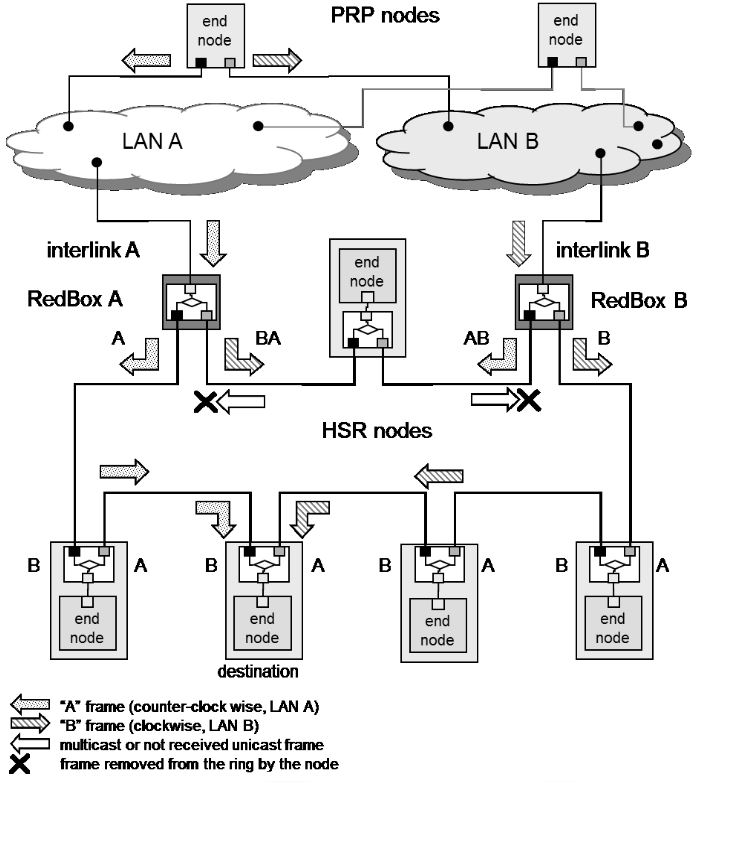
HSR-HSR mode — this is the half-QuadBox configuration, which leads directly to the next topic.
QuadBox: Coupling Two Rings Together
A QuadBox is defined in IEC 62439-3 as a quadruple port device connecting two peer HSR rings, which behaves as an HSR node in each ring and is able to filter traffic and forward it from ring to ring.
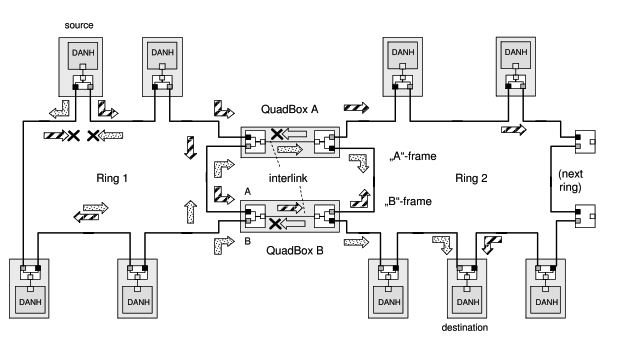
In plain terms: two HSR rings, independent of each other, connected through a single device that acts as a full member of both.
How it’s built
A QuadBox is physically two RedBoxes sharing an interlink. Each RedBox half sits in one ring, handling the ring protocol normally — forwarding frames around, managing duplicates, sending supervision. The interlink between them carries traffic from one ring to the other.
Because a QuadBox behaves as a standard HSR node in each ring, it’s transparent to the other ring members. They just see another node.
Why you always see two QuadBoxes
Between every pair of coupled rings you’ll always find two QuadBoxes — QuadBox A and QuadBox B. This isn’t just a belt-and-suspenders redundancy choice. It’s how the HSR protocol works.
HSR sends every frame twice: an A-frame going one way around the ring and a B-frame going the other way. QuadBox A handles the A-frame path from one ring to the next; QuadBox B handles the B-frame path. Both are needed for the protocol to function correctly. A single QuadBox would break the dual-path mechanism that makes HSR seamless.
On top of that, a single QuadBox would also be a single point of failure — if that device failed, the two rings would lose their connection entirely. The two-QuadBox arrangement handles both requirements at once: the protocol works correctly, and a device failure doesn’t kill inter-ring connectivity.
There are also loop prevention rules baked in. A QuadBox filters traffic based on MAC address learning and VLAN filtering to make sure frames don’t loop back. And the standard is explicit: you cannot use QuadBoxes or PRP networks to connect HSR rings in a mesh that would create loops. The topology rules are strict on this.
QuadBox vs. two separate RedBoxes
You might wonder: can’t you just use two RedBoxes in HSR-HSR mode instead of a QuadBox? Yes — and that’s exactly what a QuadBox is. It’s two RedBoxes with an interlink between them, packaged as a single device or implemented as two cooperating units. The standard specifies both the QuadBox as a concept and the HSR-HSR RedBox mode as its building block.
Side by Side
| RedBox | QuadBox | |
|---|---|---|
| Primary role | Connects SANs (or PRP networks) to an HSR ring | Connects two HSR rings to each other |
| Ports | Two HSR ring ports + one or more SAN/interlink ports | Four HSR ports (two per ring) |
| Protocol role | DANP (full PRP node) when used in PRP; HSR node in ring | HSR node in each ring |
| Redundancy | Provides redundancy to non-redundant devices | Provides inter-ring connectivity |
| Single point of failure risk | Mitigated by having devices connect via standard Ethernet | Yes — always deploy two QuadBoxes |
Where You’ll Encounter This
In substation automation and industrial process control, you typically see RedBoxes wherever legacy IEDs or single-port protection relays need to participate in a PRP or HSR network. They’re common at the boundary of older bays being integrated into a modern IEC 61850 architecture.
QuadBoxes show up when the traffic load on a single HSR ring exceeds what that ring can handle — the standard is explicit that this is the primary reason to couple rings. Worth noting: the standard also explicitly states that coupling rings through a QuadBox does not improve end-to-end transmission delay. You’re adding capacity, not reducing latency. Two rings coupled by a QuadBox pair give you a scalable architecture without giving up zero-recovery-time behavior.
Both devices are standard parts of the IEC 62439-3 architecture. If you’re commissioning or designing a high-availability Ethernet network in a substation or industrial plant, you’ll almost certainly need to know how both fit in.