
RabbitMQ is an open source message broker. It sits between the parts of a system that produce data and the parts that consume it, and it moves messages between them. Neither side has to know the other exists. They only need to know the broker.
In industrial automation, that role fits a common problem. Plants run a mix of systems that all need to share data without being wired directly together — SCADA servers, IIoT gateways, MES platforms, historians, and cloud applications. RabbitMQ connects them through reliable asynchronous messaging, so a gateway can keep publishing readings even when a historian or cloud service is busy or briefly offline. The messages wait in a queue and get delivered when the far side is ready.
That single idea — a middleman that decouples senders from receivers — is what makes RabbitMQ useful. A publisher hands a message to the broker and moves on. The broker holds it and delivers it to whoever is meant to receive it, whenever that consumer is ready. The two sides run on their own schedule, in their own language, on their own hardware.
This page covers the model as a whole: how messages flow, what each object in the broker does, which protocol RabbitMQ actually speaks, and where it fits next to tools you may already run. Each section links to a deeper article when you need one.
Table of Contents
The pattern RabbitMQ is built for
Most people start with request-response. A client asks, waits, and gets an answer back on the same connection. It works, but it couples the two sides tightly. The caller is blocked until the reply comes. If the far end is slow or down, the caller feels it directly.
Message queuing works the other way. It is one-way and asynchronous. A producer publishes a message and does not wait for a reply. The message lands in a queue and stays there until a consumer picks it up. If a reply is needed, it comes back later through the same mechanism, with the roles reversed.
Email is the everyday version of this. You send a message. It travels through servers, lands in an inbox, and waits until the recipient reads it. You do not hold the line open until they answer. RabbitMQ applies that same shape to communication between software components.
This buys you a few concrete things:
- Producers and consumers can fail independently. One going down does not take the other with it.
- You can update either side on its own, without a coordinated release.
- You can add more consumer instances when the load grows, and the queue spreads work across them.
- The two sides can be written in different languages and still talk through the broker.
The AMQP routing model
RabbitMQ does not drop a message straight into a queue. Messages go through a routing layer first. Understanding that layer is the whole game, because it is where RabbitMQ differs from simpler queues.
Here is the path a message takes:
Producer → exchange → binding → queue → consumer
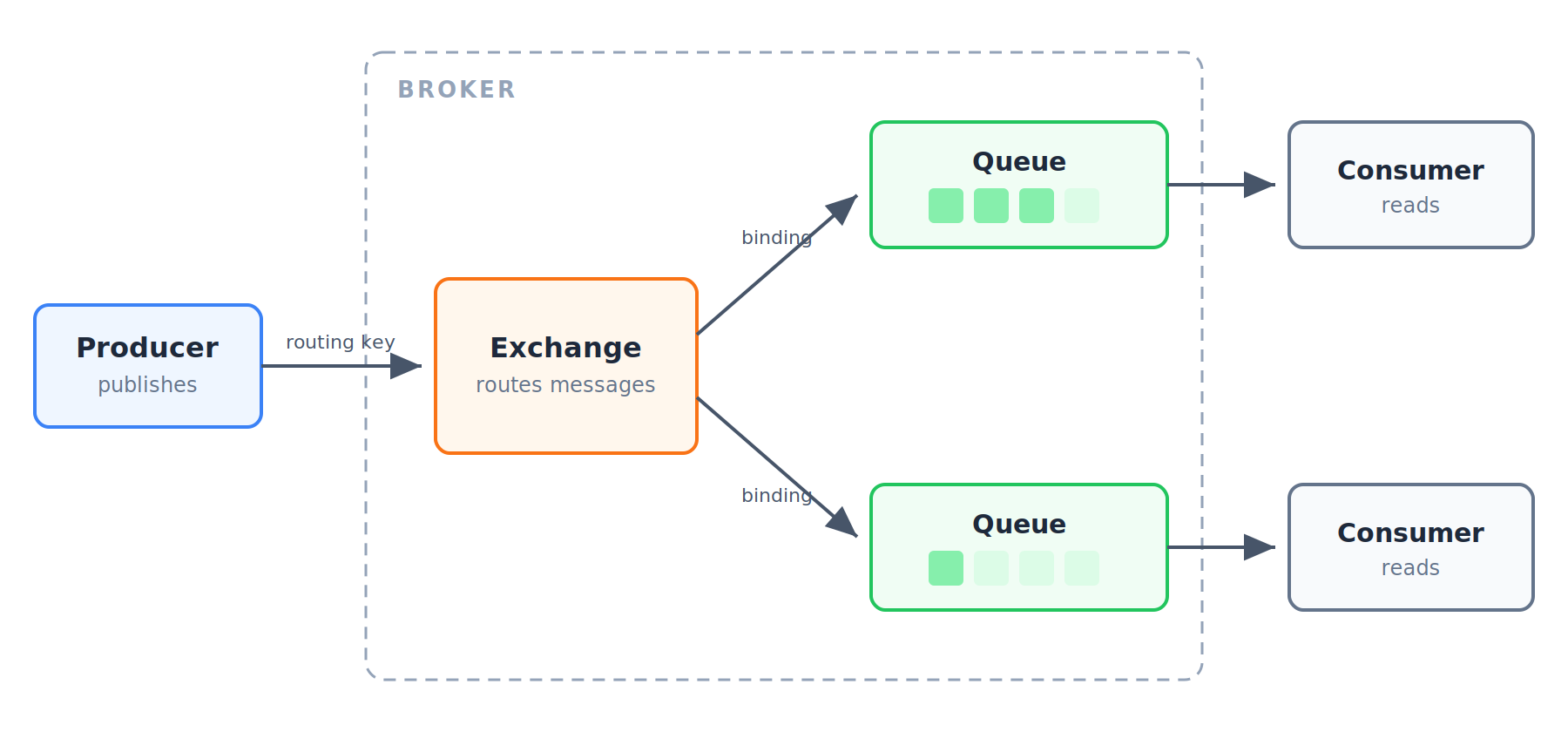
A producer publishes a message. It does not name a queue. Instead it publishes to an exchange, usually with a routing key attached — a short string that describes the message.
The exchange is the router. It takes the incoming message and decides which queues should get a copy, based on its type and the bindings attached to it. A queue must be bound to at least one exchange before it can receive anything.
A binding is the link between an exchange and a queue. It tells the exchange, “send matching messages here.” The rule inside the binding depends on the exchange type.
A queue holds messages in order until a consumer reads them. The queue lives inside the broker.
A consumer subscribes to a queue and processes messages as they arrive.
The key point: producers publish to exchanges, not queues. This indirection is what lets you change routing without touching producer code. You rewire bindings; the producer keeps publishing the same way.
Exchange types at a glance
The exchange type decides how routing keys and bindings are matched. There are four:
- Direct — point-to-point. The message goes to queues whose binding key exactly matches the routing key.
- Fanout — multicast. The message goes to every bound queue, and the routing key is ignored.
- Topic — publish-subscribe with pattern matching. Bindings use wildcard patterns, so one message can reach a whole class of queues.
- Headers — routing based on message header values instead of the routing key.
There is also a default exchange — a nameless direct exchange that every queue is automatically bound to by its own name. Publish to it with a queue name as the routing key and the message lands in that queue. It is handy for quick point-to-point work, but leaning on it hides the routing model you will usually want.
Each type has its place, and picking the wrong one is a common early mistake.
A word on AMQP versions
This trips up more people than anything else, so pin it down early.
RabbitMQ’s native protocol is AMQP 0-9-1. That is the version it implements, with a few custom extensions the spec allows. The whole model above — exchanges, bindings, routing keys — comes from AMQP 0-9-1.
There is also AMQP 1.0. It shares a name and almost nothing else. AMQP 1.0 was published at the end of 2011 after the standard moved to OASIS, and the revision was drastic. Core concepts were dropped — the exchange, for one, does not exist in 1.0. It is a genuinely different protocol, not a newer edition of the same one.
RabbitMQ can speak AMQP 1.0 through a plugin, but 0-9-1 is what you get by default and what the ecosystem is built around. When a client library, a tutorial, or a config option says “AMQP,” assume it means 0-9-1 unless it says otherwise. The two are not interchangeable.
AMQP is not the only protocol the broker will accept. Plugins let clients connect over MQTT, STOMP, Web MQTT (MQTT over WebSockets), and AMQP 1.0. That matters in the field: a device fleet already publishing over MQTT can point straight at RabbitMQ without changing anything, while the rest of the system keeps talking AMQP on the same broker.
What runs under the hood
RabbitMQ is written in Erlang. That is not a trivia point — it shapes the tool. Erlang was built for telecom switches, where processes run for years and failures are isolated rather than fatal. RabbitMQ inherits that: strong support for concurrency, distribution, and clustering comes from the runtime itself.
The broker keeps its own state in Mnesia, Erlang’s built-in database. Mnesia stores the definitions — users, exchanges, queues, bindings. Message data itself sits in the queue index and a shared message store, which track where each message is and whether it has been delivered.
Clustering leans on Erlang’s native clustering. Several brokers join into one logical unit and share definitions across nodes. Broker-to-broker links across data centers are handled by separate mechanisms built on top.
The core broker is deliberately small, and plugins extend it. The web management interface is a plugin. So is AMQP 1.0 support, MQTT support, and much else. You turn on what you need.
Connections and channels
One detail worth knowing before you write any client code: RabbitMQ separates the TCP connection from the channel.
Opening a TCP connection is expensive, so a client opens one connection and then multiplexes many lightweight channels over it. Each channel acts like its own virtual connection. Publishing, consuming, and declaring queues all happen on a channel, not directly on the connection. Reuse one connection, open channels as needed, and do not open a fresh connection per message. This is a frequent source of resource problems in production.
Reliability basics
A queue is only useful if you can trust it not to lose messages. RabbitMQ gives you controls for that, and the defaults are not always the safe ones.
Acknowledgments let a consumer tell the broker a message was handled. Until the ack arrives, the broker keeps the message and can redeliver it if the consumer dies. A consumer can also send a negative acknowledgment (a nack) to reject a message.
Prefetch limits how many unacknowledged messages a consumer can hold at once. Set it too high and one slow consumer hoards a pile of messages; set it to a sane value and work spreads evenly.
Durability decides whether queues and messages survive a broker restart. A queue can be durable and a message can be marked persistent, but both have to line up for a message to actually survive.
These three together are how you build toward zero message loss.
Where RabbitMQ fits
RabbitMQ is general-purpose messaging, and it shows up wherever components need to talk without being wired directly together.
Microservices. Services push messages to queues instead of calling each other over HTTP. That keeps them loosely coupled — a service can be down for a deploy while messages pile up safely, then drain when it returns.
Task queues. A producer enqueues jobs, and a pool of worker consumers pulls them off and processes them. Add workers to go faster. This is the classic background-job pattern — image processing, email sending, report generation.
Telemetry and IIoT aggregation. In industrial and IoT setups, RabbitMQ often sits behind the edge as a central hub, collecting readings from many sources and fanning them out to storage, dashboards, and analytics. Its MQTT plugin lets it accept MQTT publishers directly, which makes it a natural aggregation point for device fleets that already speak MQTT.
If your devices already talk MQTT, the real question is whether you also need a broker with rich routing.
Getting started
Two things get you moving. Turn on the management plugin for a web UI that shows connections, queues, exchanges, and message rates — it is the fastest way to see what the broker is doing. Then pick a client library for your language. For Python, that is pika.
From there, the rest of this cluster fills in each object and pattern in depth.
Core objects reference
| Object | What it does |
|---|---|
| Broker | The RabbitMQ server that receives, routes, and delivers messages |
| Virtual host (vhost) | A named partition inside a broker that isolates its own users, exchanges, and queues |
| Connection | A single TCP connection between a client and the broker |
| Channel | A lightweight virtual connection multiplexed over one TCP connection |
| Exchange | The router that decides which queues a message goes to |
| Routing key | A string on a message that the exchange matches against bindings |
| Binding | The link between an exchange and a queue, carrying the match rule |
| Queue | An ordered holding area for messages inside the broker |
| Producer | A client that publishes messages to an exchange |
| Consumer | A client that subscribes to a queue and processes messages |
FAQ
Is RabbitMQ free? Yes. RabbitMQ is open source under the Mozilla Public License and free to run in production. Paid commercial support and managed hosting are available if you want them, but the broker itself has no license cost.
Is RabbitMQ an MQTT broker? Not by default — its native protocol is AMQP 0-9-1. With the MQTT plugin enabled, it can also act as an MQTT broker, so MQTT publishers and subscribers connect to the same instance that handles your AMQP traffic. That is why it is often used as an aggregation hub for device fleets.
What is the difference between AMQP and MQTT? AMQP is a richer protocol with broker-side routing built in — exchanges, queues, and bindings decide where each message goes. MQTT is a lightweight publish-subscribe protocol built for constrained devices and low-bandwidth links, with a simpler topic-based model. AMQP gives you more routing control; MQTT gives you a smaller footprint.
Can RabbitMQ replace Kafka? Sometimes, but they solve different problems. RabbitMQ is a broker built for flexible routing, task queues, and request-driven messaging. Kafka is a distributed log built for high-throughput event streaming and replaying history. If you need rich routing and per-message handling, RabbitMQ fits. If you need to stream and re-read massive ordered event data, Kafka fits.
Is RabbitMQ suitable for SCADA systems? For the messaging and integration layer, yes. RabbitMQ works well as the backbone that moves data between SCADA servers, IIoT gateways, MES, historians, and cloud services. It is not a real-time control protocol, though — it does not replace deterministic fieldbus or control-loop communication. Keep it above the control layer, handling telemetry, events, and system-to-system integration.
Can RabbitMQ replace Kafka? Sometimes, but they solve different problems. RabbitMQ is a broker built for flexible routing, task queues, and request-driven messaging. Kafka is a distributed log built for high-throughput event streaming and replaying history. If you need rich routing and per-message handling, RabbitMQ fits. If you need to stream and re-read massive ordered event data, Kafka fits. Match the tool to the pattern rather than swapping one for the other by default.
Is RabbitMQ suitable for SCADA systems? For the messaging and integration layer, yes. RabbitMQ works well as the backbone that moves data between SCADA servers, IIoT gateways, MES, historians, and cloud services. It is not a real-time control protocol, though — it does not replace deterministic fieldbus or control-loop communication. Keep it above the control layer, handling telemetry, events, and system-to-system integration.