
The Distributed Network Protocol (DNP3) is a widely used SCADA communication protocol designed to enable reliable data exchange between master stations and outstations. It is optimized for transmitting small, structured data packets efficiently and reliably in industrial environments
A key strength of DNP3 lies in its object-based data model, which organizes data into object groups, variations, and indices. This structured approach enables flexible, efficient, and interoperable communication across devices from different vendors.
Table of Contents
1. DNP3 Object-Based Data Model
DNP3 uses an object library at the application layer to represent all data exchanged between devices.
According to the DNP3 reference manual:
- Data is organized into object groups (types of data)
- Each object is further defined by variations (format of data)
- Individual data points are identified by indexes
This model allows:
- Standardized communication
- Efficient data transmission
- Support for multiple data types in a single message
2. DNP3 Data Objects
DNP3 data objects represent real-world measurements and control points stored in device databases.
Typical data types include:
- Binary inputs (e.g., breaker status)
- Analog inputs (e.g., voltage, temperature)
- Counters (e.g., energy usage)
- Control outputs
As explained in the DNP3 primer:
- These data points are stored as arrays in outstation databases
- Each element is identified by a zero-based index
This structure allows efficient access and transmission of large numbers of data points.
3. Object Groups (Data Categories)
DNP3 organizes objects into groups, where each group represents a category of data.
Examples:
- Binary Inputs
- Analog Inputs
- Counters
- Binary Outputs
- Analog Outputs
Groups define what type of data is being communicated, not how it is formatted.
The DNP3 manual describes this as:
Data objects are “broadly grouped together into Object Groups such as Binary Input Objects and Analog Input Objects”
4. Variations (Data Representation)
Each object group contains multiple variations, which define how the data is encoded.
Variations specify:
- Data format (integer, floating point)
- Size (16-bit, 32-bit, etc.)
- Presence of additional information (e.g., flags, timestamps)
For example, analog data may be transmitted as:
- Integer values
- Floating-point values
- With or without status flags
This flexibility allows DNP3 to:
- Optimize bandwidth
- Match device capabilities
- Provide detailed or compact data formats
5. Object Headers and Message Structure
DNP3 transmits data objects using object headers, which are part of the application layer message.
Each object header contains:
- Group number
- Variation number
- Qualifier field
- Range or count of objects
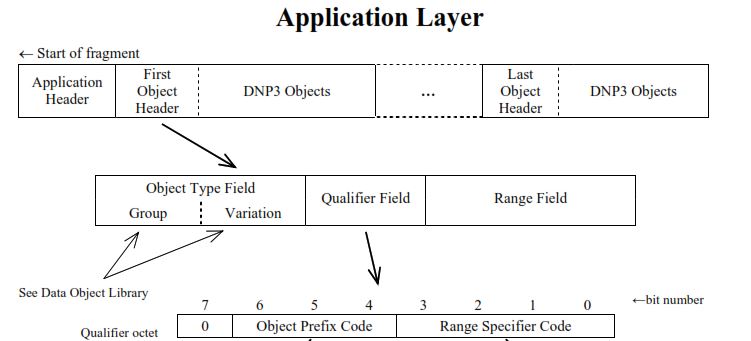
The diagram clearly shows:
- Object headers precede the actual data
- Multiple objects can be included in a single message
This structure allows:
- Efficient bulk data transfer
- Flexible addressing of data points
6. Indexing of Data Points
Each data object is identified by an index (point number).
- Indexes are zero-based
- Represent specific field devices or measurements
- Used to access data within object groups
From the primer:
“Element numbers are called point indexes… the lowest element is always identified as zero”
This enables scalable systems with thousands of data points.
7. Static and Event Objects
DNP3 defines two main types of data:
Static Objects
- Represent current values
- Retrieved using polling
- Belong to Class 0
Event Objects
- Represent changes in data
- Stored in event buffers
- Assigned to Class 1, 2, or 3 (priority levels)
From the DNP3 manual:
- Event data is returned when the master polls a specific class
- Only changed data is transmitted, improving efficiency
8. Class-Based Data Organization
DNP3 assigns data objects to classes:
- Class 0 → Static data
- Class 1 → High-priority events
- Class 2 → Medium-priority events
- Class 3 → Low-priority events
This allows:
- Priority-based polling
- Efficient bandwidth usage
- Faster reporting of critical events
9. Efficient Data Transmission
The object model supports efficient communication by:
- Sending only changed (event) data
- Allowing multiple object types in one message
- Supporting unsolicited responses
DNP3 systems can operate in:
- Polling mode (master requests data)
- Quiescent mode (report-by-exception)
In quiescent mode:
- Outstations send data only when changes occur
- Communication remains idle otherwise
10. Practical Example
In a substation SCADA system:
- Binary Input → Breaker ON/OFF
- Analog Input → Voltage level
- Counter → Energy consumption
Each data point:
- Belongs to a group
- Has a variation (format)
- Is identified by an index
- May be assigned a class
The master station retrieves:
- All static data (Class 0)
- Only changed event data (Class 1–3)
DNP3 Data Objects – Complete List of Groups and Variations
The table below presents a consolidated summary of all DNP3 object groups and variations defined in IEEE Std 1815-2012.
This summary includes every supported object group, its variation numbers, and the official object description. It serves as a quick-reference guide for DNP3 implementers, system integrators, and protocol analysts, showing the full range of static data, events, commands, counters, analog values, device attributes, and time-related objects available across all subset levels.
Objects are sorted by Group number and then by Variation for easy lookup. Variations that appear only in higher levels (e.g., floating-point, time-tagged events, or device attributes) are clearly identified by their presence in Level 4.
Complete List of DNP3 Objects and Variations
| Group | Variation | Description |
|---|---|---|
| 0 | 209 | Device Attributes— Secure authentication version |
| 0 | 210 | Device Attributes— Number of security statistics per association |
| 0 | 211 | Device Attributes— Identifier of support for user-specific attributes |
| 0 | 212 | Device Attributes— Number of master-defined data set prototypes |
| 0 | 213 | Device Attributes— Number of outstation-defined data set prototypes |
| 0 | 214 | Device Attributes— Number of master-defined data sets |
| 0 | 215 | Device Attributes— Number of outstation-defined data sets |
| 0 | 216 | Device Attributes— Max number of binary outputs per request |
| 0 | 217 | Device Attributes— Local timing accuracy |
| 0 | 218 | Device Attributes— Duration of timing accuracy |
| 0 | 219 | Device Attributes— Support for analog output events |
| 0 | 220 | Device Attributes— Max analog output index |
| 0 | 221 | Device Attributes— Number of analog outputs |
| 0 | 222 | Device Attributes— Support for binary output events |
| 0 | 223 | Device Attributes— Max binary output index |
| 0 | 224 | Device Attributes— Number of binary outputs |
| 0 | 225 | Device Attributes— Support for frozen counter events |
| 0 | 226 | Device Attributes— Support for frozen counters |
| 0 | 227 | Device Attributes— Support for counter events |
| 0 | 228 | Device Attributes— Max counter index |
| 0 | 229 | Device Attributes— Number of counter points |
| 0 | 230 | Device Attributes— Support for frozen analog inputs |
| 0 | 231 | Device Attributes— Support for analog input events |
| 0 | 232 | Device Attributes— Maximum analog input index |
| 0 | 233 | Device Attributes— Number of analog input points |
| 0 | 234 | Device Attributes— Support for double-bit binary input events |
| 0 | 235 | Device Attributes— Maximum double-bit binary input index |
| 0 | 236 | Device Attributes— Number of double-bit binary input points |
| 0 | 237 | Device Attributes— Support for binary input events |
| 0 | 238 | Device Attributes— Max binary input index |
| 0 | 239 | Device Attributes— Number of binary input points |
| 0 | 240 | Device Attributes— Max transmit fragment size |
| 0 | 241 | Device Attributes— Max receive fragment size |
| 0 | 242 | Device Attributes— Device manufacturer’s software version |
| 0 | 243 | Device Attributes— Device manufacturer’s hardware version |
| 0 | 245 | Device Attributes— User-assigned location name |
| 0 | 246 | Device Attributes— User assigned ID code/number |
| 0 | 247 | Device Attributes— User-assigned device name |
| 0 | 248 | Device Attributes— Device serial number |
| 0 | 249 | Device Attributes— DNP3 subset and conformance |
| 0 | 250 | Device Attributes— Device manufacturer’s product name and model |
| 0 | 252 | Device Attributes— Device manufacturer’s name |
| 0 | 254 | Device Attributes— Non-specific all attributes request |
| 0 | 255 | Device Attributes— List of attribute variations |
| 1 | 0 | Binary Input— Any Variation |
| 1 | 1 | Binary Input— Packed format |
| 1 | 2 | Binary Input— With flags |
| 2 | 0 | Binary Input Event— Any Variation |
| 2 | 1 | Binary Input Event— Without time |
| 2 | 2 | Binary Input Event— With absolute time |
| 2 | 3 | Binary Input Event— With relative time |
| 3 | 0 | Double-bit Binary Input— Any Variation |
| 3 | 1 | Double-bit Binary Input— Packed format |
| 3 | 2 | Double-bit Binary Input— With flags |
| 4 | 0 | Double-bit Binary Input Event— Any Variation |
| 4 | 1 | Double-bit Binary Input Event— Without time |
| 4 | 2 | Double-bit Binary Input Event— With absolute time |
| 4 | 3 | Double-bit Binary Input Event— With relative time |
| 10 | 0 | Binary Output— Any Variation |
| 10 | 2 | Binary Output— Output status with flags |
| 11 | 0 | Binary Output Event— Any Variation |
| 11 | 1 | Binary Output Event— Status without time |
| 11 | 2 | Binary Output Event— Status with time |
| 12 | 0 | Binary Command— Control relay output block (CROB) |
| 12 | 1 | Binary Command— Control relay output block (CROB) |
| 13 | 0 | Binary Output Command Event— Any Variation |
| 13 | 1 | Binary Output Command Event— Command status without time |
| 13 | 2 | Binary Output Command Event— Command status with time |
| 20 | 0 | Counter— Any Variation |
| 20 | 1 | Counter— 32-bit with flag |
| 20 | 2 | Counter— 16-bit with flag |
| 20 | 5 | Counter— 32-bit without flag |
| 20 | 6 | Counter— 16-bit without flag |
| 21 | 0 | Frozen Counter— Any Variation |
| 21 | 1 | Frozen Counter— 32-bit with flag |
| 21 | 2 | Frozen Counter— 16-bit with flag |
| 21 | 5 | Frozen Counter— 32-bit with flag and time |
| 21 | 6 | Frozen Counter— 16-bit with flag and time |
| 21 | 9 | Frozen Counter— 32-bit without flag |
| 21 | 10 | Frozen Counter— 16-bit without flag |
| 22 | 0 | Counter Event— Any Variation |
| 22 | 1 | Counter Event— 32-bit with flag |
| 22 | 2 | Counter Event— 16-bit with flag |
| 23 | 0 | Frozen Counter Event— Any Variation |
| 23 | 1 | Frozen Counter Event— 32-bit with flag |
| 23 | 2 | Frozen Counter Event— 16-bit with flag |
| 23 | 5 | Frozen Counter Event— 32-bit with flag and time |
| 23 | 6 | Frozen Counter Event— 16-bit with flag and time |
| 30 | 0 | Analog Input— Any Variation |
| 30 | 1 | Analog Input— 32-bit with flag |
| 30 | 2 | Analog Input— 16-bit with flag |
| 30 | 3 | Analog Input— 32-bit without flag |
| 30 | 4 | Analog Input— 16-bit without flag |
| 30 | 5 | Analog Input— Single-prec flt-pt with flag |
| 32 | 0 | Analog Input Event— Any Variation |
| 32 | 1 | Analog Input Event— 32-bit without time |
| 32 | 2 | Analog Input Event— 16-bit without time |
| 32 | 3 | Analog Input Event— 32-bit with time |
| 32 | 4 | Analog Input Event— 16-bit with time |
| 32 | 5 | Analog Input Event— Single-prec flt-pt without time |
| 32 | 7 | Analog Input Event— Single-prec flt-pt with time |
| 34 | 0 | Analog Input Deadband— Any Variation |
| 34 | 1 | Analog Input Deadband— 16-bit |
| 34 | 2 | Analog Input Deadband— 32-bit |
| 40 | 0 | Analog Output Status— Any Variation |
| 40 | 1 | Analog Output Status— 32-bit with flag |
| 40 | 2 | Analog Output Status— 16-bit with flag |
| 41 | 1 | Analog Output— 32-bit |
| 41 | 2 | Analog Output— 16-bit |
| 50 | 1 | Time and Date— Absolute time |
| 51 | 1 | Time and Date CTO— Absolute time, synchronized |
| 51 | 2 | Time and Date CTO— Absolute time, unsynchronized |
| 52 | 1 | Time Delay— Coarse |
| 52 | 2 | Time Delay— Fine |
| 60 | 1 | Class Objects— Class 0 data |
| 60 | 2 | Class Objects— Class 1 data |
| 60 | 3 | Class Objects— Class 2 data |
| 60 | 4 | Class Objects— Class 3 data |
| 80 | 1 | Internal Indications— Packed format |
Conclusion
The DNP3 data model—based on objects, groups, variations, and indices—provides a structured and flexible framework for representing industrial data. This model enables:
- Efficient communication
- Scalable system design
- Interoperability across vendors
- Reliable data handling in SCADA systems
By separating data type (groups) from data format (variations), DNP3 achieves both flexibility and efficiency, making it one of the most effective protocols for industrial automation.