
Every OPC UA interaction starts with a simple concept: a client asks, a server answers. But beneath that simplicity sits a carefully layered architecture that handles discovery, security, sessions, subscriptions, and more — all defined in the IEC 62541 standard.
This guide explains how the OPC UA client-server architecture works from the ground up. Whether you’re developing an application, integrating equipment, or evaluating OPC UA for your plant, understanding this architecture is essential.
Table of Contents
The Big Picture
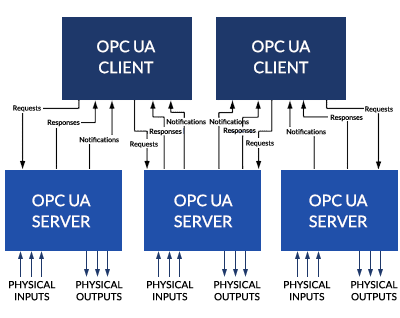
The OPC UA system architecture is built around clients and servers that interact as partners. According to IEC 62541 Part 1, each system may contain multiple clients and servers. Each client can talk to one or more servers at the same time, and each server can handle one or more clients simultaneously.
An application can even combine both roles — acting as a server to some applications while acting as a client to others. This is common in aggregating servers that collect data from lower-level devices and present it to higher-level systems.
What Does a Client Do?
An OPC UA client is any application that connects to a server to consume data or trigger actions. In practice, this could be a SCADA system reading production values, an MES collecting order data, a historian archiving process trends, a cloud platform pulling analytics data, or an engineering tool configuring a device.
Client architecture
Inside, the client has two main components.
The client application is the actual code that implements the business logic — what data to read, what actions to take, how to display information to the user.
The OPC UA communication stack handles the low-level work of converting API calls into OPC UA messages, encrypting them, sending them over the network, and receiving responses. The stack is separated from the application by an internal API, which means you can swap communication stacks without changing your application code.
The client communicates with the server through two types of message flows. Request/response messages are for direct operations: read this value, write that setpoint, call this method. Publish/notification messages are for subscriptions: the client tells the server “notify me when these values change” and the server pushes updates as they happen.
What Does a Server Do?
An OPC UA server exposes data from industrial equipment to clients. It could be running on a PLC, an edge gateway, an industrial PC, or a cloud instance.
Server architecture
The server has more moving parts than the client.
Real objects are the physical or software things the server represents — a motor, a temperature sensor, a diagnostic counter, a production line.
The server application is the code that maps real objects to the OPC UA address space and handles client requests. It decides what data to expose, how to organize it, and what methods to offer.
The address space is the structured data model that clients interact with. It contains nodes representing objects, variables, methods, and types — all connected by references. Clients browse the address space to discover what the server offers.
Monitored items are entities created by clients to watch specific nodes for changes. When a value changes or an alarm triggers, the monitored item generates a notification.
Subscriptions collect notifications from monitored items and deliver them to clients at a configured rate.
The communication stack handles message encoding, security, and transport — the same role as on the client side.
The Connection Lifecycle
Understanding how a client connects to a server step by step is critical for troubleshooting and development.
Step 1: Discovery
Before connecting, the client needs to find the server. OPC UA provides a Discovery Service Set for this purpose.
Individual servers can respond to discovery requests directly. For larger systems, dedicated Discovery Servers maintain a registry of all available OPC UA servers on the network. A client queries the Discovery Server and gets back a list of available servers, their endpoints, and their security configurations.
The client then calls GetEndpoints on the chosen server to learn what security policies, message encodings, and transport protocols it supports.
Step 2: Secure Channel
Once the client picks an endpoint, it establishes a Secure Channel. This is a long-running encrypted connection between the client and server.
During Secure Channel creation, the client and server exchange X.509 certificates to authenticate each other, negotiate which cryptographic algorithms to use (based on the security policy), and derive shared encryption keys for signing and encrypting all further messages.
The Secure Channel is managed by the communication stack, not the application. As IEC 62541 Part 1 explains, the Secure Channel maintains keys known only to the client and server, and all incoming messages are verified against the security policy. Any message that doesn’t conform is ignored.
The Secure Channel is separate from the session. If the network drops and the Secure Channel breaks, the session above it can survive. The client re-establishes the Secure Channel and reconnects to the same session.
Step 3: Session
With the Secure Channel in place, the client creates a Session. This is the application-level logical connection.
Sessions are stateful — they hold information like user credentials, subscriptions, and continuation points for operations that span multiple requests. The session is where user authentication happens. The client presents user credentials (username/password, certificate, or enterprise token) and the server verifies them.
Sessions have a negotiated timeout. If the client goes silent for too long, the server closes the session. This prevents abandoned sessions from consuming resources indefinitely.
A key design point: sessions are independent of the underlying transport. If a TCP connection drops, the session doesn’t die immediately. The client has a window to reconnect. This is crucial in industrial environments where brief network interruptions are common.
Step 4: Normal operations
Once the session is active, the client can use the full range of OPC UA services: browse the address space, read and write values, call methods, create subscriptions, and receive notifications.
The Service Sets
OPC UA services are organized into logical groups called Service Sets. IEC 62541 Part 4 defines them all. Here are the ones that matter most.
Discovery Service Set
Finds servers on the network and retrieves their endpoint information, including supported security policies.
SecureChannel Service Set
Opens and manages the encrypted channel between client and server. Handles certificate exchange and key negotiation.
Session Service Set
Creates and manages application-level sessions. Handles user authentication through the ActivateSession service.
View Service Set
Lets clients browse the address space by navigating nodes and following references. Browsing is how clients discover what a server offers without prior knowledge of its structure.
Attribute Service Set
Reads and writes node attribute values. This is the core data access service — when you read a temperature value, you’re using the Attribute Service Set.
Method Service Set
Invokes methods on objects. Methods represent callable functions — like starting a motor, running a calibration, or resetting a counter. A method executes on the server and returns a result to the client.
MonitoredItem Service Set
Creates and manages monitored items — entities that watch nodes for value changes, status changes, or events. Monitored items generate notifications when their trigger conditions are met.
Subscription Service Set
Creates and manages subscriptions that deliver notifications to clients. A subscription collects notifications from its monitored items and publishes them to the client at a configured interval.
Query Service Set
Allows clients to search the address space based on filter criteria without manually browsing the hierarchy. Like a database query against the address space.
NodeManagement Service Set
Lets clients add, modify, and delete nodes in the address space. This is used for server configuration, not normal data operations.
Subscriptions and Monitored Items: The Notification Engine
The subscription model is one of OPC UA’s most powerful features. Instead of polling (constantly asking “has anything changed?”), clients subscribe to data and receive updates only when something actually changes.
How it works
The client creates a subscription with a publishing interval — say, every 500 milliseconds.
The client then creates monitored items within that subscription, each watching a specific node. Each monitored item has its own sampling rate (how often the server checks the value) and a filter (what constitutes a reportable change — for example, a deadband of 0.5°C).
When a monitored item detects a change that passes its filter, it generates a notification and queues it. At the next publishing interval, the subscription collects all queued notifications and sends them to the client in a NotificationMessage.
If nothing changes, the subscription sends keep-alive messages so the client knows the connection is still active.
Lost message recovery
Each NotificationMessage carries a sequence number. If a client detects a gap in the sequence, it can ask the server to resend the missing messages. This built-in recovery mechanism means data isn’t lost even if a message is dropped on the network.
Subscription lifetime
Subscriptions have a configured lifetime that clients must periodically renew. If no client renews the lifetime, the server closes the subscription and deletes all its monitored items. This prevents orphaned subscriptions from consuming resources.
A subscription can even outlive its creating client. A second client — perhaps a redundant backup — can take over the subscription and continue receiving notifications.
Server-to-Server Communication
OPC UA doesn’t limit you to simple client-server pairs. A server can also act as a client to other servers. IEC 62541 Part 1 defines two patterns.
Peer-to-peer
Two servers each act as both client and server to each other. They exchange information directly — useful for redundancy, synchronization, or maintaining system-wide type definitions.
Chained servers
Servers are layered in a hierarchy. A plant-floor server collects data from devices. An operations server acts as a client to the plant-floor server and aggregates data for its own clients. An enterprise server does the same at a higher level.
This chained architecture enables vertical data access — from the sensor on the factory floor all the way up to the enterprise dashboard — with each layer adding its own semantic context. The standard describes this as a three-layer model: device semantic layer, process semantic layer, and enterprise semantic layer.
OPC UA Pub/Sub: Beyond Client-Server
While the client-server model handles most industrial use cases, OPC UA also supports a publish-subscribe (Pub/Sub) pattern for scenarios where the client-server model doesn’t fit well.
In Pub/Sub, a publisher sends data to a message broker or multicast group without knowing who will receive it. Subscribers listen for messages they’re interested in. This decoupled model is better for one-to-many distribution (one data source, many consumers), cloud integration over MQTT or AMQP, high-frequency data where connection overhead matters, and large-scale deployments with hundreds of data consumers.
OPC UA Pub/Sub can use MQTT, AMQP, or UDP as transport. It carries the same OPC UA data model and information — just delivered through a different communication pattern.
Redundancy
The IEC 62541 standard includes built-in support for redundancy at both the client and server level.
Server redundancy means running two or more servers that provide the same data. If the primary server fails, clients switch to the backup. OPC UA defines how this failover works so that different vendors implement it consistently.
Client redundancy means running backup clients that can take over subscriptions from a failed primary client. Because subscriptions are independent of the client session, a backup client can resume receiving notifications without data loss.
Practical Architecture Patterns
Pattern 1: Direct connection
The simplest setup. One client connects directly to one server. A SCADA system reading data from a PLC’s built-in OPC UA server. This is the most common pattern in small to medium installations.
Pattern 2: Multiple clients, one server
Several clients connect to the same server simultaneously. The SCADA reads real-time values. The historian archives data. The MES pulls production counts. The analytics platform monitors trends. The OPC UA server handles all of them through separate sessions.
Pattern 3: Aggregating server
An intermediate server collects data from multiple lower-level servers and presents a unified view to clients above it. This simplifies client configuration — instead of connecting to 50 PLCs, the SCADA connects to one aggregating server.
Pattern 4: Gateway
An OPC UA server acts as a protocol translator. It connects to devices using their native protocol (Modbus, PROFINET, EtherNet/IP) and exposes the data through OPC UA. This brings legacy and non-OPC devices into the OPC UA ecosystem.
Conclusion
The OPC UA client-server architecture is built in layers — transport, Secure Channel, session — each with a clear responsibility. This separation means security doesn’t depend on the network, sessions survive connection drops, and applications are independent of the communication stack.
The service sets provide a complete toolkit: discovery for finding servers, browsing for exploring data, reading and writing for data access, methods for remote function calls, and subscriptions for efficient event-driven communication.
For more complex scenarios, server-to-server communication enables aggregation and chaining, Pub/Sub adds scalable one-to-many distribution, and built-in redundancy support ensures high availability.
Understanding these building blocks is the foundation for designing, developing, and troubleshooting any OPC UA system. Whether you’re connecting a single PLC or architecting a plant-wide integration, the patterns start here.