Key takeaways
- Modbus TCP port 502 in depth: IANA registration, connection lifecycle, client limits, firewall rules, Wireshark filters, and the TLS secure variant on port 802.
- Focus protocol: MODBUS — see the reference page for frame format, OSI layer, and port/ethertype details.
- Related topics: Modbus, Modbus TCP, port 502, MBAP.
- Read time: 14 · 3,028 words · published .
Every Modbus TCP/IP device listens on TCP port 502. This single port carries all Modbus communication over Ethernet — read requests, write commands, exception responses, and diagnostics.
Port 502 is registered with IANA under the service name mbap (Modbus Application Protocol). It has carried Modbus traffic since Modbus TCP was introduced by Schneider in the late 1990s.
Despite being one number, port 502 is at the center of most Modbus TCP problems: firewalls blocking it, connection limits being exceeded, security vulnerabilities being exploited, and configuration mismatches causing timeouts.
This guide covers everything about port 502 — how it works, how to configure it, how to secure it, how to troubleshoot it, and how the new Modbus/TCP Security specification adds TLS encryption on port 802.
- 1. Port 502: The IANA Registration
- 2. How Modbus TCP Communication Works on Port 502
- 3. The TCP Connection Lifecycle
- 4. MBAP Header: What Gets Sent on Port 502
- 5. Client and Server Roles
- 6. Connection Limits: How Many Clients Can Connect
- 7. Why Modbus TCP Can Be Slow on a Fast Network
- 8. Can You Change the Port from 502
- 9. Port 802: Modbus/TCP Security with TLS
- 10. Firewall Configuration for Port 502
- 11. Verifying Port 502 Is Open and Listening
- 12. Wireshark Filters for Modbus TCP Traffic
- 13. Security Risks of Port 502
- 14. How to Secure Port 502 in Industrial Networks
- 15. Troubleshooting Port 502 Problems
- 16. Port 502 in Real Systems
- Decode and Test Your Modbus Frames
1. Port 502: The IANA Registration
Port 502 is registered with IANA under the service name mbap:
| Field | Value |
|---|---|
| Service name | mbap |
| Port number | 502 |
| Transport | TCP and UDP |
| Description | Modbus Application Protocol |
| Registrant | Modbus Organization |
| Secure variant | mbap-s, port 802 |
Two things often get confused here.
IANA registers both 502/tcp and 502/udp under the same service name. The registry entry covers both transports.
The Modbus TCP specification defines TCP only. Some vendors implement Modbus over UDP, and it works, but it sits outside the specification and gives up the ordering and retransmission that Modbus TCP relies on. Do not use it in production unless a supplier requires it.
The port was not always Modbus. It previously carried asa-appl-proto, a Cisco service, and was reassigned to the Modbus Application Protocol later. Some older operating systems still ship an /etc/services file with the outdated entry, which is why netstat occasionally labels port 502 traffic with the wrong service name.
The name mbap refers to the MBAP header — the 7-byte header that wraps every Modbus PDU in a TCP frame.
2. How Modbus TCP Communication Works on Port 502
Modbus TCP uses a client-server model over TCP/IP:
- The server (slave) listens on TCP port 502 and waits for incoming connections.
- The client (master) opens a TCP connection to the server's IP address on port 502.
- The client sends Modbus requests (read registers, write coils, etc.).
- The server processes each request and sends a response.
- The TCP connection stays open for subsequent requests.
The client uses an ephemeral port (typically 49152–65535) on its side. The server always listens on port 502.
Example: A SCADA system at 192.168.1.10 connects to an energy meter at 192.168.1.100:502. The SCADA uses ephemeral port 52341. All Modbus frames flow between 192.168.1.10:52341 and 192.168.1.100:502.
3. The TCP Connection Lifecycle
Understanding the connection lifecycle helps with troubleshooting.
Step 1 — TCP Three-Way Handshake Client sends SYN to server port 502. Server responds with SYN-ACK. Client sends ACK. Connection established.
Step 2 — Modbus Transactions Client sends a Modbus request inside the MBAP header. Server processes and responds. This repeats for every poll cycle.
Step 3 — Connection Stays Open The Modbus specification recommends keeping TCP connections open rather than reconnecting for each transaction. Opening and closing connections wastes time and resources.
Step 4 — Connection Close The client closes the connection when it no longer needs to poll the device. Either side can close with a TCP FIN.
Step 5 — Connection Timeout If no traffic flows for a configurable period, many servers close idle connections automatically. Typical idle timeout: 30–120 seconds (device-dependent).
4. MBAP Header: What Gets Sent on Port 502
Every Modbus TCP message starts with a 7-byte MBAP header followed by the Modbus PDU.
| Field | Size | Example | Meaning |
|---|---|---|---|
| Transaction ID | 2 bytes | 00 01 | Unique ID matching request to response |
| Protocol ID | 2 bytes | 00 00 | Always 0x0000 for Modbus |
| Length | 2 bytes | 00 06 | Number of bytes following (Unit ID + PDU) |
| Unit ID | 1 byte | 01 | Slave address (1–247) or 0xFF for direct TCP device |
Example: Read 3 Holding Registers from Slave 6
Request on port 502:
00 01 00 00 00 06 06 03 00 6B 00 03
| Bytes | Field | Value |
|---|---|---|
| 00 01 | Transaction ID | 1 |
| 00 00 | Protocol ID | Modbus |
| 00 06 | Length | 6 bytes follow |
| 06 | Unit ID | Slave 6 |
| 03 | Function Code | Read Holding Registers |
| 00 6B | Start Address | 107 (register 40108 in 1-based notation) |
| 00 03 | Quantity | 3 registers |
Note the addressing. The frame carries 107. Vendor documentation for the same register usually prints 40108, because it counts holding registers from 1 and prefixes the table. Subtract 40001 from the documented number to get the address that goes in the frame.
The MBAP header replaces the slave address and CRC used in Modbus RTU. The Unit ID serves the same purpose as the slave address — it identifies which device should respond, especially when a gateway bridges TCP to a serial bus with multiple RTU slaves.
For a deeper look at frame structure, see: Modbus Function Codes Explained
5. Client and Server Roles
| Role | Also Called | Initiates Connection | Listens on Port 502 |
|---|---|---|---|
| Client | Master | Yes (opens TCP connection) | No |
| Server | Slave | No (waits for connections) | Yes |
A single device can act as both client and server simultaneously. For example, a PLC can be a Modbus TCP server (other systems read its data on port 502) while also being a client (it polls energy meters on their port 502).
Unit ID 0 and 255 Behind a Gateway
The Unit ID values 0x00 and 0xFF are reserved for devices addressed directly over TCP. A Modbus TCP/RTU gateway will not forward a request carrying either value onto the serial bus. It treats the request as addressed to itself.
This produces one of the most confusing symptoms in Modbus TCP commissioning: the TCP connection succeeds, the gateway answers, but the serial device never does.
When polling through a gateway, always use the actual RTU slave address, 1 to 247. When polling a native TCP device with no serial side, try 1 first, then 255. A few devices accept any value and ignore the field entirely.
6. Connection Limits: How Many Clients Can Connect
Every Modbus TCP server has a maximum number of simultaneous TCP connections. This is a hardware and firmware limitation, not a protocol limitation.
| Device Type | Typical Max Connections |
|---|---|
| Budget energy meters | 1–2 |
| Mid-range PLCs | 4–8 |
| Industrial PLCs (Siemens, Allen-Bradley) | 8–16 |
| Protocol gateways | 4–32 |
| Software simulators | 50–100+ |
If you exceed the limit, new connections are refused or existing connections are dropped. This is a common cause of intermittent communication failures in systems with multiple SCADA clients polling the same device.
Fix: Use a single SCADA master as the Modbus client and distribute data internally, or use a data concentrator/gateway.
7. Why Modbus TCP Can Be Slow on a Fast Network
Ping shows 0.3 ms. The switch is idle. And your poll cycle still takes 200 ms per device.
This is usually not a network problem. It is the interaction of two standard TCP mechanisms with Modbus traffic.
Nagle's algorithm buffers small outgoing writes. If a socket has unacknowledged data in flight, further small writes are held until the acknowledgment arrives or a full segment accumulates.
Delayed ACK does the opposite on the receiving side. The receiver waits before acknowledging, hoping to piggyback the ACK on outgoing data. Typical delay is 40 ms on Linux and up to 200 ms on Windows.
Modbus TCP frames are tiny — a read request is 12 bytes. When a client stack writes the MBAP header and the PDU in two separate socket writes, Nagle holds the second write until the server acknowledges the first, and the server delays that acknowledgment. Every transaction pays the penalty.
How to recognize it
| Sign | What it means |
|---|---|
| Response times cluster around 40 ms or 200 ms multiples | Delayed ACK is setting the pace, not the device |
| Ping is sub-millisecond but Modbus is slow | Not a bandwidth or congestion problem |
| One client is slow, another is fast on the same device | Client stack difference, not device difference |
| Wireshark shows a gap between request and ACK, then an immediate response | The device was ready; the ACK was late |
How to fix it
- Set
TCP_NODELAYon the socket. This disables Nagle. Every serious Modbus stack does it; some in-house drivers do not. - Write the complete ADU — MBAP header plus PDU — in a single socket write. This removes the root cause rather than the symptom.
- Do not try to fix it by tuning delayed ACK on the operating system. It is a global setting and it affects everything else on the machine.
If you cannot change the client, check whether it exposes a "no delay" or "disable Nagle" option in its connection settings. Many SCADA drivers do.
8. Can You Change the Port from 502
Yes. Most devices allow custom port configuration. Common alternatives:
| Port | Use Case |
|---|---|
| 502 | Default — use unless there is a reason to change |
| 802 | Modbus/TCP Security (TLS-encrypted) |
| 1502 | Security-through-obscurity (not recommended as sole protection) |
| 5020 | Used by some vendors for secondary Modbus service |
If you change the port, every client must be reconfigured to match. Firewall rules must also be updated. Changing the port does not add security — it only hides the service from basic scans.
9. Port 802: Modbus/TCP Security with TLS
The Modbus/TCP Security specification (published by the Modbus Organization) adds TLS encryption and X.509 certificate-based authentication to Modbus TCP.
| Feature | Port 502 (standard) | Port 802 (secure) |
|---|---|---|
| Encryption | None | TLS 1.2+ |
| Authentication | None | X.509v3 certificates |
| Data integrity | TCP checksum only | TLS HMAC |
| Role-based access | None | Defined per certificate |
| Backward compatible | — | Vendor-dependent. Some devices fall back to port 502 when TLS fails; this is not defined by the specification |
Port 802 is registered with IANA under the service name "mbap-s" (Modbus Application Protocol — Secure).
The TLS handshake happens first, then standard Modbus TCP frames flow inside the encrypted TLS tunnel. The MBAP header and PDU structure remain unchanged — only the transport is encrypted.
Adoption is still limited. Most legacy devices do not support port 802. For existing installations, VPN tunnels remain the most practical way to encrypt Modbus TCP traffic.
10. Firewall Configuration for Port 502
Linux (iptables)
Allow Modbus TCP traffic from a specific SCADA IP:
iptables -A INPUT -p tcp --dport 502 -s 192.168.1.10 -j ACCEPT
iptables -A INPUT -p tcp --dport 502 -j DROP
Linux (firewalld)
firewall-cmd --permanent --add-port=502/tcp
firewall-cmd --reload
Windows Firewall
netsh advfirewall firewall add rule name="Modbus TCP 502" dir=in action=allow protocol=tcp localport=502Industrial Firewall Best Practice
| Rule | Source | Destination | Port | Action |
|---|---|---|---|---|
| Allow SCADA | 192.168.1.10 | 192.168.2.0/24 | 502 | ALLOW |
| Allow engineering | 192.168.1.20 | 192.168.2.0/24 | 502 | ALLOW |
| Block everything else | any | any | 502 | DROP |
⚠️ Warning: Never expose port 502 to the internet. Thousands of Modbus devices are found on Shodan every day. Always use VPN for remote access.
11. Verifying Port 502 Is Open and Listening
From the server side (is the device listening?)
Linux:
ss -tlnp | grep 502Windows:
netstat -an | findstr 502From the client side (can I reach the device?)
Using netcat:
nc -zv 192.168.1.100 502Using nmap:
nmap -p 502 192.168.1.100Using telnet:
telnet 192.168.1.100 502If the connection is refused, either port 502 is not open on the device, a firewall is blocking it, or the device is not reachable on the network.
When Port 502 Is Already in Use
A simulator or a gateway service left running will hold port 502 and block whatever you start next. The error message is rarely explicit.
# Linux — which process owns it
ss -tlnp | grep :502

# Windows — get the PID, then the process name
netstat -ano | findstr :502
tasklist /FI "PID eq <pid>"
Usual suspects: a Modbus simulator from a previous test session, a protocol gateway service that starts automatically, or a Docker container with a port mapping still active.
12. Wireshark Filters for Modbus TCP Traffic
| Filter | What It Shows |
|---|---|
modbus | All Modbus TCP traffic |
tcp.port == 502 | All traffic to/from port 502 |
tcp.dstport == 502 | Requests sent to Modbus servers |
tcp.srcport == 502 | Responses from Modbus servers |
modbus.func_code == 3 | Only FC 03 (Read Holding Registers) |
modbus.func_code == 16 | Only FC 16 (Write Multiple Registers) |
modbus.func_code >= 128 | Only exception responses |
ip.addr == 192.168.1.100 && tcp.port == 502 | Modbus traffic to/from one device |
modbus && frame.time_delta > 1 | Slow responses (> 1 second gap) |
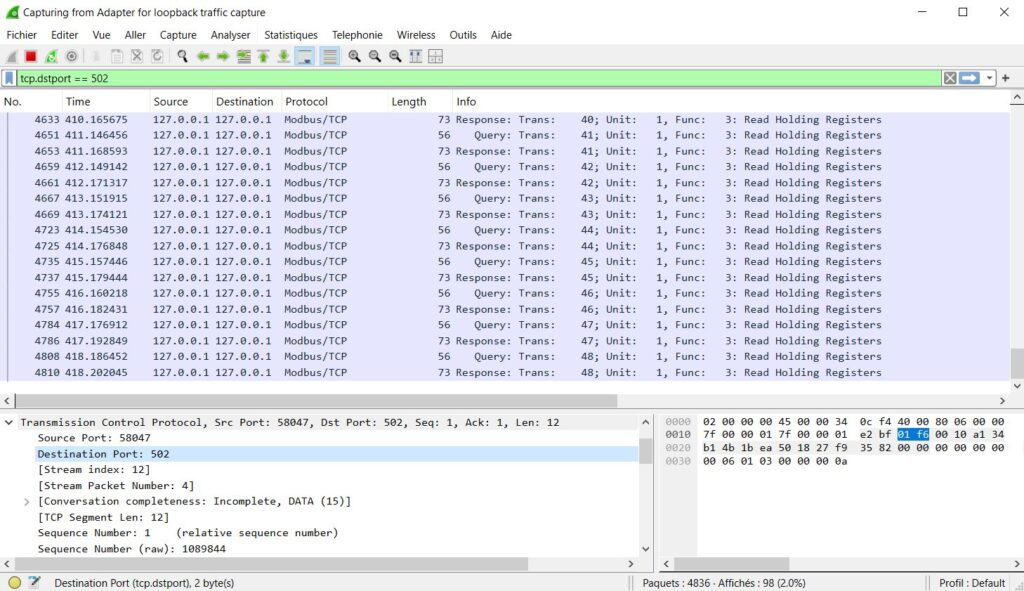
Wireshark capture showing Modbus TCP/IP queries and responses on port 502
To test, run a Modbus client tool (like ModbusPoll or QModMaster) and capture with Wireshark on the same machine. You will see the MBAP header, function code, register addresses, and data values in plain text.
13. Security Risks of Port 502
Modbus TCP has zero built-in security:
- No authentication — any device that can reach port 502 can read all data and send any command
- No encryption — all data is plaintext, including register values and control commands
- No access control — there is no concept of user roles or permissions
- Predictable protocol — Modbus frames are simple and easy to craft with basic tools
Real Threats
| Attack | How It Works |
|---|---|
| Unauthorized read | Attacker connects to port 502 and reads all register data (process values, setpoints, alarms) |
| Command injection | Attacker sends FC 05 or FC 16 to write values — change setpoints, open valves, stop motors |
| Reconnaissance | Attacker scans port 502 across a network to map all Modbus devices |
| Man-in-the-middle | Attacker intercepts and modifies Modbus frames between client and server |
| Denial of service | Attacker floods port 502 with connections, exhausting the device's connection limit |
14. How to Secure Port 502 in Industrial Networks
Since Modbus TCP has no built-in security, protection must come from the network.
| Measure | What It Does |
|---|---|
| Network segmentation | Place Modbus devices on a dedicated VLAN. Separate from corporate/IT networks. |
| Firewall rules | Allow only authorized SCADA IPs to reach port 502. Block all others. |
| VPN for remote access | Never expose port 502 to WAN or internet. Use encrypted VPN tunnels. |
| Industrial IDS/IPS | Deploy OT intrusion detection to watch for abnormal Modbus commands on port 502. |
| Modbus/TCP Security (port 802) | Upgrade to TLS-encrypted Modbus where devices support it. |
| Disable unused services | If a device does not need to be a Modbus server, disable port 502. |
| Connection monitoring | Alert on unexpected client connections to port 502. |
15. Troubleshooting Port 502 Problems
Half-Open Connections After a Device Restart
A device is power-cycled, replaced, or reboots after a firmware update. Its TCP state is gone. But your SCADA client still holds a socket it believes is established.
What happens next depends on the network:
- If the device is reachable, it answers the next packet with a TCP RST and the client socket closes. A good driver reconnects. A poor one reports a permanent failure.
- If the device is not yet back, nothing answers. The client waits for its own timeout, which may be far longer than your poll cycle.
- Worst case, the device comes back with its connection slots still consumed by stale entries from sessions that were never closed with a FIN. It refuses new connections until its own idle timeout expires — often 30 to 120 seconds.
That last one explains a symptom that looks impossible: a device that refuses connections right after a restart, then accepts them a minute later with no intervention.
Checks
# Linux — how many sockets does the client think it has open to 502?
ss -tn state established '( dport = :502 )'

# Windows
netstat -an | findstr :502
Compare that count against what the device reports. A mismatch is your answer.
Fixes
- Enable TCP keep-alive on the client, with an interval shorter than the device idle timeout
- Set the application timeout shorter than the device idle timeout, so the client notices first
- After swapping a device, flush the driver's connection pool rather than waiting
- During commissioning only, configure the client to close the connection after each poll — it is slower, but it removes the variable while you diagnose
| Problem | Likely Cause | Solution |
|---|---|---|
| Cannot connect to device | Firewall blocking port 502 | Check firewall rules. Test with nc -zv IP 502. |
| Connection refused | Modbus service not enabled on device | Enable Modbus TCP in device configuration. Verify with netstat. |
| Timeout after connection | Wrong Unit ID | Check the Unit ID. Through a gateway, use the actual RTU slave address (1–247). Direct to a TCP device, try 1 then 255. |
| Intermittent disconnections | Connection limit exceeded | Reduce the number of Modbus TCP clients. Check device max connections. |
| Wrong data values | Register address offset or byte order | Verify zero-based vs one-based addressing. Check register map. |
| Exception code in response | Invalid function code or register address | Check the exception code returned. Verify FC and register exist on device. |
| Slow response | Network congestion or device overload | Check network latency with ping. Reduce poll rate. Read registers in larger blocks. |
| Connection drops after idle | Server idle timeout | Enable TCP keep-alive on client side, or reduce idle timeout on server. |
16. Port 502 in Real Systems
Energy Monitoring
A SCADA server polls 50 energy meters. Each meter listens on port 502 at its own IP address. The SCADA opens 50 TCP connections and polls every 5 seconds.
PLC Communication
A Siemens S7-1200 reads holding registers from a VFD (variable frequency drive). Both devices are on the same subnet. The PLC connects to the VFD on port 502 and reads speed, current, and status registers.
RTU-to-TCP Gateway
A Modbus TCP/RTU gateway listens on port 502. The SCADA sends TCP requests with Unit ID = 5. The gateway converts them to RTU frames and sends them to slave 5 on the RS-485 bus. For a full guide, see: How to Convert Modbus RTU to Modbus TCP
Multi-Site Remote Monitoring
A control center monitors remote pump stations over VPN. Each site has a PLC on port 502 behind a VPN gateway. The SCADA connects through the VPN tunnel to each PLC's local IP on port 502.
Decode and Test Your Modbus Frames
Need to verify your Modbus TCP frames? Use our free Online Modbus Frame Decoder & Encoder Tool to decode MBAP headers, function codes, and register values instantly.