
DNP3 (Distributed Network Protocol 3.0) is the dominant SCADA protocol in North America for electric utilities, water systems, and oil and gas. It runs over TCP or UDP on port 20000.
Wireshark fully decodes DNP3 — data link layer, transport layer, and application layer. You can see every function code, object group, data point index, quality flag, and timestamp in plain text.
But DNP3 is more complex than Modbus. It has multi-fragment responses, unsolicited messages, class-based event polling, and CRC checks at the data link layer. Knowing which Wireshark filters to use and what to look for makes the difference between solving a problem in minutes and staring at packets for hours.
This guide covers capture setup, verified display filters, how to read decoded DNP3 packets, and how to diagnose the most common DNP3 communication problems.
In This Guide
1. How DNP3 Appears in Wireshark
Wireshark decodes DNP3 as three layers:
| Layer | What It Shows |
|---|---|
| DNP3 Data Link Layer | Start bytes (0x0564), length, control, source/destination addresses, CRC |
| DNP3 Transport Layer | FIR/FIN bits (first/last fragment), sequence number |
| DNP3 Application Layer | Function code, object headers, data objects with values, quality flags, timestamps |
The Info column shows a summary like:
READ - Request, Class 1, 2, 3, 0
RESPONSE - Solicited, Class 1, 2, 3, 0
UNSOLICITED RESPONSE - Class 1 Events
2. How to Capture DNP3 Traffic
Capture Filter
tcp port 20000Or if DNP3 runs over UDP:
udp port 20000Where to Capture
| Location | When to Use |
|---|---|
| On the SCADA master | See all polls and responses from every outstation |
| On the communication front-end processor | If the master uses a separate comm server |
| On a network switch (port mirroring) | Non-intrusive capture |
| On a serial-to-Ethernet converter | If DNP3 serial traffic is converted to TCP |
3. Decoding DNP3 on Non-Standard Ports
Wireshark decodes DNP3 automatically on port 20000. Many real-world installations use different ports (e.g., 4999, 5000, 19999, or vendor-specific ports).
If your DNP3 traffic appears as raw TCP data:
Fix: Use “Decode As”
- Right-click a packet on the non-standard port
- Select Decode As…
- Set: Field = TCP port, Value = your port, Current = DNP 3.0
- Click OK
Fix: Change Preferences
- Go to Edit → Preferences → Protocols → DNP 3.0
- Change the TCP Port and/or UDP Port values
- Click OK
4. Display Filters for DNP3
All filter field names verified against the official Wireshark DNP3 Display Filter Reference (222 fields, versions 1.0.0 to 4.6.4).
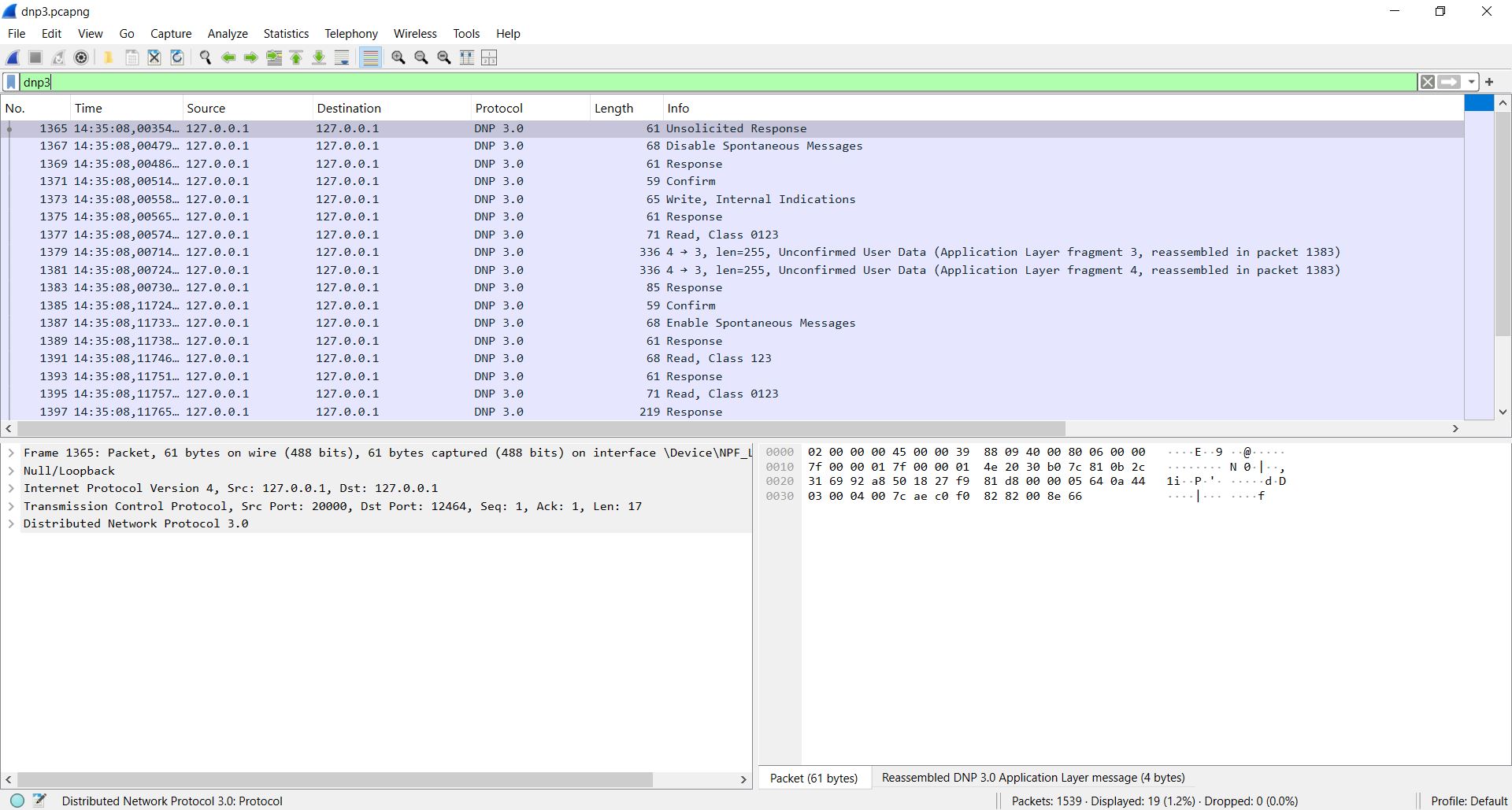
Basic Filters
| Filter | What It Shows |
|---|---|
dnp3 | All DNP3 traffic |
tcp.port == 20000 | All traffic on DNP3 port |
tcp.dstport == 20000 | Requests to outstations |
tcp.srcport == 20000 | Responses from outstations |
Address Filters
| Filter | What It Shows |
|---|---|
dnp3.src | Source DNP3 address |
dnp3.dst | Destination DNP3 address |
dnp3.src == 1 | Traffic from outstation address 1 |
dnp3.dst == 3 | Traffic to outstation address 3 |
Function Code Filters
| Filter | What It Shows |
|---|---|
dnp3.al.func == 1 | Read requests (FC 01) |
dnp3.al.func == 129 | Responses (FC 129 = 0x81) |
dnp3.al.func == 130 | Unsolicited responses (FC 130 = 0x82) |
dnp3.al.func == 2 | Write requests (FC 02) |
dnp3.al.func == 3 | Select (CROB select, FC 03) |
dnp3.al.func == 4 | Operate (CROB operate, FC 04) |
dnp3.al.func == 5 | Direct operate (FC 05) |
dnp3.al.func == 6 | Direct operate no ACK (FC 06) |
dnp3.al.func == 20 | Enable unsolicited (FC 20) |
dnp3.al.func == 21 | Disable unsolicited (FC 21) |
dnp3.al.func == 23 | Delay measurement (FC 23) |
dnp3.al.func == 13 | Cold restart (FC 13) |
dnp3.al.func == 14 | Warm restart (FC 14) |
Application Layer Filters
| Filter | What It Shows |
|---|---|
dnp3.al.iin | Internal Indications (IIN) bits |
dnp3.al.iin.rst | IIN — Device Restart bit |
dnp3.al.iin.obju | IIN — Object Unknown |
dnp3.al.iin.nfcn | IIN — No Function Code Support |
dnp3.al.iin.cls1d | IIN — Class 1 Data Available |
dnp3.al.iin.cls2d | IIN — Class 2 Data Available |
dnp3.al.iin.cls3d | IIN — Class 3 Data Available |
dnp3.al.obj | Object group and variation |
dnp3.al.index | Object point index |
Data Type Filters
| Filter | What It Shows |
|---|---|
dnp3.al.bit | Binary input value (single bit) |
dnp3.al.2bit | Double-bit binary input value |
dnp3.al.ana.int | Analog input value (16-bit integer) |
dnp3.al.ana.float | Analog input value (float) |
dnp3.al.ana.double | Analog input value (double) |
dnp3.al.anaout.int | Analog output value (integer) |
dnp3.al.anaout.float | Analog output value (float) |
dnp3.al.cnt | Counter value |
dnp3.al.timestamp | Object timestamp |
Quality Flag Filters
| Filter | What It Shows |
|---|---|
dnp3.al.biq.b0 == 0 | Binary input — Offline (not online) |
dnp3.al.biq.b1 == 1 | Binary input — Restart flag set |
dnp3.al.biq.b2 == 1 | Binary input — Comm Fail |
dnp3.al.biq.b3 == 1 | Binary input — Remote Force |
dnp3.al.biq.b5 == 1 | Binary input — Chatter Filter active |
dnp3.al.aiq.b2 == 1 | Analog input — Comm Fail |
dnp3.al.aiq.b5 == 1 | Analog input — Over-Range |
CRC Filter
| Filter | What It Shows |
|---|---|
dnp.data_chunk.CRC.status | CRC check status for data chunks |
dnp.hdr.CRC.status | CRC check status for the data link header |
Combination Examples
All unsolicited responses from a specific outstation:
dnp3.al.func == 130 && dnp3.src == 5All responses with Restart IIN bit set:
dnp3.al.iin.rst == 1Analog input events with Comm Fail quality:
dnp3.al.aiq.b2 == 1Filter by a specific point index:
dnp3.al.index == 42 && dnp3.al.ana.floatSlow responses (> 2 seconds between packets):
dnp3 && frame.time_delta > 25. How to Read a Decoded DNP3 Packet
Click on a DNP3 packet and expand the three layers:
Data Link Layer
DNP 3.0 Data Link Layer
    Start Bytes: 0x0564
    Length: 15
    Control: 0xc0 (DIR, PRM, FCV=0, FCB=0, Func: Unconfirmed User Data)
    Destination: 3
    Source: 1
Header CRC: 0xABCD [correct]- Source/Destination = DNP3 addresses (not IP addresses)
- DIR = direction (1 = master → outstation, 0 = outstation → master)
- PRM = primary message (1 = from initiator)
Transport Layer
DNP 3.0 Transport Layer
FIR: 1, FIN: 1, Sequence: 0- FIR = first fragment. FIN = last fragment. Both 1 = single-fragment message.
- If FIR=1 and FIN=0, the message is multi-fragment — look for the next fragment.
Application Layer
DNP 3.0 Application Layer
    Application Control: FIR, FIN, Sequence 0
    Function Code: RESPONSE (129)
    Internal Indications: Class 1 Events
    Object: Binary Input - Packed Format (Obj: 01, Var: 01)
        Index: 0, Value: 1
        Index: 1, Value: 0
    Object: Analog Input - 16-Bit (Obj: 30, Var: 01)
        Index: 0, Quality: Online, Value: 2301
        Index: 1, Quality: Online, Value: 1456
6. What a Healthy DNP3 Conversation Looks Like
A typical DNP3 TCP poll cycle:
| # | Direction | DNP3 Info |
|---|---|---|
| 1 | Master → Outstation | READ – Class 1, 2, 3, 0 |
| 2 | Outstation → Master | RESPONSE – Solicited, Binary Inputs, Analog Inputs, Counters |
| 3 | Master → Outstation | READ – Class 1, 2, 3, 0 |
| 4 | Outstation → Master | RESPONSE – Solicited (no events, static data only) |
Key signs of healthy communication:
- Every READ has a matching RESPONSE
- IIN bits show no errors (no Restart, no Object Unknown, no Comm Fail)
- All quality flags show Online
- Responses arrive within 100–500 ms
- No TCP retransmissions
7. Diagnosing No Response from an Outstation
Filter: dnp3 && ip.addr == <outstation IP>
| What You See | Cause | Fix |
|---|---|---|
| READ sent, no RESPONSE | Outstation offline or not reachable | Ping the outstation. Check cable and port 20000. |
| TCP SYN, no SYN-ACK | Outstation is down or firewall blocks port 20000 | Check power. Check firewall rules. |
| RESPONSE with IIN Restart bit | Outstation recently restarted | Master should send Confirm and re-enable unsolicited. |
| RESPONSE with IIN Object Unknown | Master requested an object the outstation does not support | Check the outstation’s device profile for supported objects. |
8. Diagnosing Unsolicited Response Problems
DNP3 outstations can send unsolicited responses when events occur, without waiting for a poll.
Filter: dnp3.al.func == 130
| Problem | What You See | Fix |
|---|---|---|
| No unsolicited responses | Outstation never sends FC 130 | Master must send Enable Unsolicited (FC 20). Verify outstation config. |
| Unsolicited responses but master does not confirm | Outstation keeps retransmitting the same unsolicited response | Master must send Application Confirm after receiving unsolicited data. |
| Events missing | Outstation sends unsolicited but some events are lost | Check event buffer size on outstation. Buffer may overflow between polls. |
9. Diagnosing Data Quality Issues
Every DNP3 data point has quality flags. Bad quality means the value is unreliable.
Filter: dnp3.al.biq.b0 == 0 (binary inputs not online) or dnp3.al.aiq.b2 == 1 (analog inputs with Comm Fail)
| Quality Flag | Meaning | Common Cause |
|---|---|---|
| Not Online (b0=0) | Point is offline | I/O module failure, wiring problem |
| Restart (b1=1) | Value not updated since device restart | Device just restarted — wait for first scan |
| Comm Fail (b2=1) | Communication failure to the field device | Serial link down, I/O module not responding |
| Remote Force (b3=1) | Value is being forced by the master | Check if an operator forced this point |
| Local Force (b4=1) | Value is being forced locally | Check if someone forced this at the outstation |
| Over-Range (b5=1, analog only) | Analog value exceeds sensor range | Check sensor wiring. Check scaling. |
10. Diagnosing CRC Errors
DNP3 uses CRC-16 checksums at the data link layer. Wireshark verifies every CRC.
Filter: dnp.hdr.CRC.status or dnp.data_chunk.CRC.status
If CRCs fail, the data link frame is corrupted. This usually means:
- Noise on the communication link (especially serial-to-Ethernet converters)
- Bad cable or connector
- Electrical interference near communication cables
- Baud rate mismatch (if converted from serial)
11. Diagnosing Slow Polls and Timeouts
Filter: dnp3 && frame.time_delta > 2
| Symptom | Cause | Fix |
|---|---|---|
| Response takes > 1 second | Outstation overloaded or slow link | Reduce poll rate. Increase response timeout. |
| Multi-fragment response with long gaps | Large data set fragmented across many packets | Normal for integrity polls with thousands of points. |
| Timeout after partial response | Fragment lost or outstation buffer overflow | Check for TCP retransmissions. Reduce data request size. |
12. Filtering by Point Index and Data Type
To track a specific point:
dnp3.al.index == 42This shows all packets containing point index 42 — any object type. To narrow it down:
dnp3.al.index == 42 && dnp3.al.ana.floatThis shows only packets where analog input index 42 appears with a float value.
Other useful combinations:
| Filter | What It Tracks |
|---|---|
dnp3.al.index == 0 && dnp3.al.bit | Binary input point 0 |
dnp3.al.index == 10 && dnp3.al.ana.int | Analog input point 10 (16-bit) |
dnp3.al.index == 5 && dnp3.al.cnt | Counter point 5 |
dnp3.al.index == 0 && dnp3.al.anaout.float | Analog output point 0 (float) |
13. Useful Wireshark Columns for DNP3 Analysis
| Column Title | Type | Field Name |
|---|---|---|
| DNP3 Src Addr | Custom | dnp3.src |
| DNP3 Dst Addr | Custom | dnp3.dst |
| Function Code | Custom | dnp3.al.func |
| Delta Time | Custom | frame.time_delta_displayed |
| Source IP | Normal | ip.src |
| Destination IP | Normal | ip.dst |
14. Common DNP3 Problems and What They Look Like in Wireshark
| Problem | Wireshark Symptom | Filter |
|---|---|---|
| Outstation offline | TCP SYN with no SYN-ACK | tcp.flags.syn == 1 && tcp.port == 20000 |
| Firewall blocking | TCP RST after SYN | tcp.flags.reset == 1 && tcp.port == 20000 |
| Wrong DNP3 address | READ sent, outstation ignores (no RESPONSE) | dnp3.dst — verify address matches outstation config |
| Unsolicited not enabled | No FC 130 packets from outstation | dnp3.al.func == 130 — if empty, send Enable Unsolicited |
| Object not supported | RESPONSE with IIN Object Unknown | dnp3.al.iin.obju == 1 |
| Device restarted | RESPONSE with IIN Restart | dnp3.al.iin.rst == 1 |
| CRC errors | Data chunk CRC failures | dnp.data_chunk.CRC.status |
| Slow response | Large time delta between request and response | dnp3 && frame.time_delta > 2 |
| Packet loss | TCP retransmissions | tcp.analysis.retransmission && tcp.port == 20000 |
| Connection drops | TCP RST or FIN during active session | tcp.flags.reset == 1 && tcp.port == 20000 |
Summary
Wireshark decodes every layer of DNP3 — data link CRC, transport fragments, and full application layer with function codes, object groups, point values, quality flags, and timestamps.
The key things to remember:
- DNP3 runs on TCP/UDP port 20000. Use Decode As if your system uses a different port.
- Use
dnp3as the main display filter - Use
dnp3.al.functo filter by function code (1=Read, 129=Response, 130=Unsolicited) - Use
dnp3.srcanddnp3.dstto filter by DNP3 address (not IP address) - Use
dnp3.al.iin.rstto find devices that have restarted - Use
dnp3.al.indexto track a specific data point across the capture - Use
dnp3.al.biq.b2ordnp3.al.aiq.b2to find points with Comm Fail quality - Check CRC status with
dnp.hdr.CRC.statusanddnp.data_chunk.CRC.status
💡 Tip: Use the free DNP3 Frame Decoder Tool to decode any DNP3 frame byte by byte — including data link CRC, transport header, function codes, and object headers.