
Modbus is simple, but real SCADA integration is rarely simple.
In power systems, automation, and industrial plants, most commissioning delays come from small configuration mistakes or physical-layer issues — not from the protocol itself.
This guide explains 15 real Modbus problems engineers face on site, how to recognize them quickly, and what practical actions solve them.
The explanations use clear engineering logic so you can apply them directly during commissioning or troubleshooting.
Table of Contents
Why Modbus Problems Happen in SCADA

Before jumping into the issues, remember one key rule:
Modbus failures are usually physical or configuration problems — not protocol problems.Typical root causes:
- Serial line wiring mistakes
- Wrong addressing or register mapping
- Overloaded polling cycles
- Device limitations or firmware behavior
Understanding the symptom pattern is what saves hours in the field.
1. No Communication — Timeouts Everywhere
Symptoms
- All tags show bad quality
- SCADA logs “No Response”
Real Causes
- Wrong slave ID
- Baudrate/parity mismatch
- A/B wires reversed
- Missing termination resistor
Field Action
Always verify serial parameters in this order:
Slave ID → Baudrate → Parity → Stop bits → WiringOne wrong setting blocks the entire bus.
2. Illegal Data Address (Exception Code 02)
This is the most common logical error.
Symptoms
- Device replies with exception
- Some registers work, others fail
Root Cause
- Address outside valid range
- Reading across undefined registers
- Offset confusion (0-based vs 1-based)
Example
Device supports registers 0–99:
Start = 96
Length = 10
SCADA tries to read register 105 → exception.
Field Tip
Split large blocks into smaller valid ranges.
3. Illegal Function (Exception Code 01)
What Happens
SCADA sends a function code the device does not support.
Example:
- Using FC04 (Input Registers) when device only supports FC03.
Practical Advice
Never assume full Modbus support — always check vendor documentation.
4. Illegal Data Value (Exception Code 03)
Common Scenario
Writing data with wrong format or byte count.
Typical mistakes:
- Writing FLOAT into INT register
- Incorrect payload length
Remember:
Exception 03 = format problem, not measurement error.5. RS-485 Noise and Grounding Problems
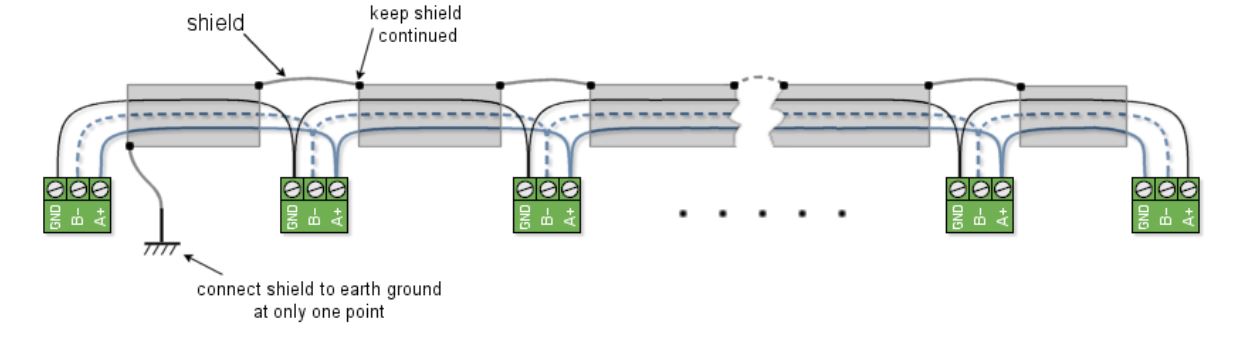
Symptoms
- Random CRC errors
- Communication unstable
Causes
- Long cable runs near power cables
- Poor shielding
- Ground loops
Field Practice
- Use shielded twisted pair
- Ground shield on one side only
- Keep distance from VFD cables
6. Slow SCADA Polling Cycle
Engineers often think the network is broken, but it’s just slow.
Real Cause
Modbus RTU is sequential.
Example calculation:
25 devices × 200 ms response = 5 s scan timeOptimization Tips
- Increase baudrate if possible
- Reduce polling frequency
- Group registers logically
7. Device Busy (Exception Code 06)
Meaning
Device received request but cannot process it immediately.
Typical situations:
- PLC heavy logic cycle
- Gateway buffering messages
SCADA Strategy
Implement retry logic with delay instead of constant polling.
8. Wrong Register Type (Holding vs Input)
Classic commissioning mistake:
SCADA reads 3xxxx
Device data exists in 4xxxx
Result:
- Zero values or exceptions.
Always confirm:
- Register type
- Function code used
9. Missing RS-485 Termination
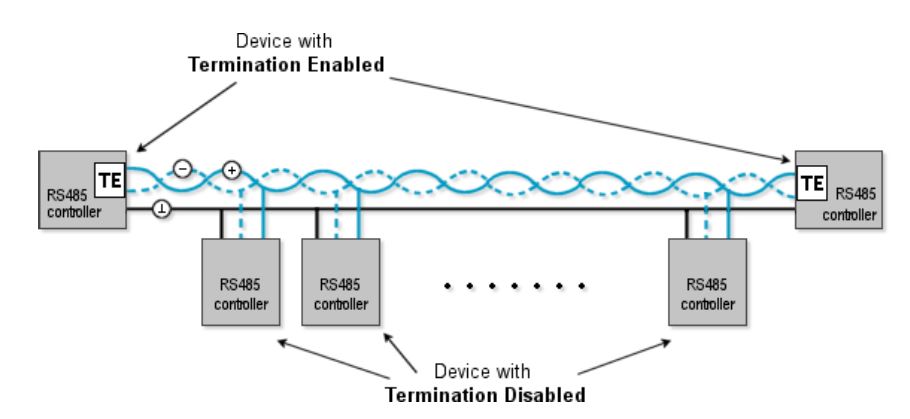
Symptoms
- Communication works with one device but fails when more are added
- Random packet loss
Fix
Install 120 Ω termination at both ends of the RS-485 bus.
Never terminate every device — only the two ends.
10. Duplicate Slave IDs
Two devices sharing the same ID cause collisions.
Signs
- Inconsistent data
- Random communication drops
Solution
Scan IDs during commissioning before connecting SCADA.
11. Modbus TCP Connected but No Data
Common Causes
- Firewall blocking port 502
- Wrong IP or unit ID
- Gateway misconfiguration
Important:
Ethernet link OK ≠ Modbus OK.12. Reading Too Many Registers in One Request
Some devices claim large limits but fail in practice.
Example:
Manual → 125 registers max
Real device stable → 40 registers
Best Practice
Test gradually and monitor response stability.
13. Address Offset Confusion (0 vs 1 Based)
Many SCADA drivers expect addresses starting from zero.
Vendor manual:
40001SCADA internal address:
0This small difference causes illegal address errors.
14. EMI From Industrial Equipment
High-power equipment injects noise into serial lines.
Sources:
- Welders
- VFDs
- Switching loads
Engineering Solutions
- Route cables away from power lines
- Use isolated converters
- Maintain proper grounding
15. Timeout Settings Too Short
If SCADA timeout is too aggressive, devices appear offline even when responding.
Example:
Device response = 80 ms
SCADA timeout = 50 ms
SCADA retries continuously → network overload.
Rule of Thumb
Timeout ≥ 3 × frame transmission timePractical Troubleshooting Workflow
When a Modbus system fails, follow this sequence:
- Physical Layer
- Wiring
- Termination
- Shielding
- Communication Parameters
- ID
- Baudrate
- Parity
- Exception Codes
- Understand device feedback
- Register Mapping
- Address
- Type
- Data format
- Polling Optimization
- Block size
- Scan rate
Most problems are solved before step four.
Real Engineering Advice
From field experience in SCADA commissioning:
≈70% of issues → wiring and serial parameters
≈20% → wrong register mapping
≈10% → device limitations or firmware behavior
Start troubleshooting from the physical layer before changing SCADA configuration.
Conclusion
Modbus itself is simple — but real industrial environments are not.
Understanding how exception codes, polling behavior, and RS-485 physics interact will drastically reduce commissioning time.
When diagnosing problems, always ask:
Is this a communication issue?
Or is the device telling me my request is wrong?
That single question often leads directly to the solution.