
Modbus is a simple protocol, but the values inside registers can be displayed in many different ways. A single 16-bit register can represent:
- an integer
- a negative value
- part of a 32-bit number
- a floating-point value
- a bit field (flags)
- ASCII characters
- hexadecimal codes
The challenge is that the Modbus protocol never tells you how to interpret the number. Only the device’s documentation explains the meaning.
To decode Modbus data correctly, engineers must understand the different data type formats used when interpreting registers.
This article explains these formats, why they matter, and how to interpret them correctly.
Table of Contents
Why Display Formats Matter in Modbus
A Modbus register is always 16 bits. But these 16 bits can be interpreted in many ways.
Example: Raw register = 0xFF00
This single register could be:
- 65280 (unsigned integer)
- −256 (signed integer)
- a bit pattern (1111 1111 0000 0000)
- two ASCII characters
- part of a float
- part of a 32-bit integer
The value is the same, but the meaning changes depending on the display format.
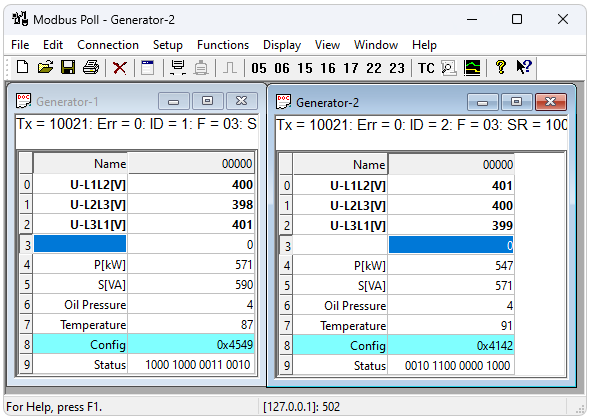
If you choose the wrong format, your numbers will look completely wrong even when communication is perfect.
The Essential Data Type Formats
Below are the formats engineers use when interpreting Modbus data.
1. Decimal (Base 10)
This is the most common interpretation.
It converts the 16-bit value into a normal human-readable number.
Example:0x000A → 10
Use decimal when reading:
- simple counters
- engineering values
- scaling factors
- configuration parameters
Decimal is easy to read, but it hides whether the number is signed or unsigned, which can cause errors.
2. Unsigned Integer (UINT16)
A UINT16 register is interpreted strictly as a positive number:
- Range: 0 to 65,535
- No negative values
Used for:
- total pulses
- frequency
- analog values
- timers
- basic counters
Example:
Register = 50000 → Valid UINT16
But if you treat it as signed, it becomes −15536, which is incorrect.
3. Signed Integer (INT16)
A signed 16-bit value can represent negative numbers.
- Range: −32,768 to +32,767
Used for:
- negative temperatures
- directional power (import/export)
- pressure deviations
- torque
- flow direction
Example:
Raw register = 0xFF38
Unsigned → 65336
Signed → −200 (correct)
Choosing the wrong interpretation is one of the most common Modbus mistakes.
4. Hexadecimal Format (Hex)
A register value displayed in base 16:
Examples:10 → 0x000A255 → 0x00FF65535 → 0xFFFF
Hexadecimal is extremely useful for:
- bitmask registers
- device error codes
- configuration flags
- serial numbers (in hex format)
- diagnostic words
Hex matches what most manufacturers show in datasheets, making it vital during troubleshooting.
5. Binary Format (Bit Pattern)
Displays all 16 bits as ON/OFF:
0b1100000100000101
Bit patterns are used for:
- relay status words
- breaker state
- alarm flags
- protection trip codes
- digital I/O expansion modules
Binary format shows exactly which bits are active, helping engineers decode flags and alarm states.
6. ASCII/Text Format
A 16-bit register can also store two ASCII characters.
Example:
0x4142 → Characters “A” (0x41) and “B” (0x42) → “AB”
Used for:
- device names
- model numbers
- firmware versions
- serial numbers
Larger text strings span multiple registers.
7. 32-Bit Integer Formats (Two Registers)
Modbus registers are 16-bit, but many devices store 32-bit values across two registers.
UINT32
Range: 0 to 4,294,967,295
Used for:
- energy counters (kWh)
- accumulated pulses
- total run-time hours
- large counters
INT32
Range: −2,147,483,648 to +2,147,483,647
Used for:
- signed energy counters
- directional active/reactive power
- large engineering units
The big challenge: word order (endianness)
- High word first
- Low word first
- Or swapped
Wrong order → completely scrambled value.
8. Floating-Point Format (FLOAT32 / IEEE-754)
Many modern devices store real numbers with decimals using the IEEE-754 standard FLOAT.
FLOAT uses two 16-bit registers (32 bits).
Example values:
- 25.6 °C
- 231.45 V
- 12.8 A
- 48.9 Hz
- 123.456 kW
FLOAT is used for:
- power and energy
- voltage/current RMS
- power factor
- temperature
- pressure
- flow
- harmonics
⚠️ The key issue: Endianness
A float can be stored in four different byte orders:
| Format | Order |
|---|---|
| ABCD | Big-endian |
| CDAB | Word-swap |
| BADC | Byte-swap |
| DCBA | Little-endian |
Wrong order → weird values such as:
- 0.00001
- −9123.88
- very large numbers
- NaN
When floats look wrong, the cause is usually the byte/word order, not the device.
9. Bitmask / Packed Boolean Format
A single register holds 16 Boolean signals.
Example:0x0125 → binary: 0000000100100101
Meaning:
- Bit 0 = ON
- Bit 2 = ON
- Bit 5 = ON
- Bit 8 = ON
Used for:
- relay status words
- alarm groups
- breaker positions
- I/O module states
Bitmask decoding is essential for interpreting protection and automation devices.
How Modbus Display Formats Affect SCADA Interpretation
If SCADA interprets the wrong format:
- positive values become negative
- counters overflow
- alarms trigger incorrectly
- floats show nonsense
- bit flags become unreadable
- ASCII text appears as random numbers
Most “Modbus problems” are actually data type interpretation errors, not communication failures.
How to Choose the Correct Display Format
To avoid incorrect values:
- Always read the device’s register map.
- Confirm the expected data type.
- Choose the correct display format (decimal, signed, float, hex, etc.).
- For multi-register values, check word/byte order.
- For bitmasks, decode each bit individually.
- For ASCII, decode characters instead of numbers.
- Compare with the device’s display or documentation.
A few minutes verifying formats prevents hours of troubleshooting.
👉 Need help verifying or correcting your Modbus display formats?
If you’re unsure whether a register should be decoded as UINT, INT, HEX, FLOAT, or a 32-bit value, our online Modbus Frame Decoder Tool can help. It instantly interprets raw Modbus frames, shows the correct data type formats, and helps you confirm byte/word ordering.
Try it here: Modbus Frame Decoder Tool
Conclusion
Modbus registers store numbers, but the meaning of those numbers changes depending on the data type and display format. Understanding formats such as:
- decimal
- signed and unsigned integers
- hexadecimal
- binary bit patterns
- ASCII
- 32-bit integers
- floating-point values
- bitmask formats
is essential for accurate SCADA and PLC interpretation.
Once you master these display formats, Modbus becomes easier to diagnose, more reliable, and far more predictable. Many confusing “Modbus issues” disappear simply by choosing the correct way to interpret the register values.using “Modbus errors” vanish simply by choosing the correct way to display the value.