Key takeaways
- Learn how IEC 60870-5-104 transmits SCADA data over Ethernet and TCP/IP, including frame structure, connection flow, and real-world implementation tips.
- Focus protocol: IEC-104 — see the reference page for frame format, OSI layer, and port/ethertype details.
- Related topics: Over Ethernet, IEC 104, TCP/IP, APDU.
- Read time: 5 · 1,093 words · published .
The IEC 60870-5-104 (IEC 104) protocol is one of the most important standards for modern SCADA and telecontrol systems. It extends the earlier IEC 60870-5-101 serial protocol by enabling communication over Ethernet and TCP/IP networks, allowing utilities and industries to operate over LAN, WAN, or even public IP networks with reliability and scalability.
This article explains — in plain yet technical language — how IEC 104 works over Ethernet, what makes it different from older serial communication methods, and how data is transmitted securely between control centers and field devices.
- From IEC 101 to IEC 104 — The Evolution to Ethernet
- IEC 104 Communication Stack Over Ethernet
- Data Transmission — APDU, APCI, and ASDU
- Frame Flow Over Ethernet
- Example: IEC 104 Over Ethernet in a Power Substation
- Security and Reliability Over Ethernet
- Monitoring and Diagnostics
- Advantages of IEC 104 Over Ethernet
- Next Step: Decode Real IEC 104 Ethernet Frames
From IEC 101 to IEC 104 — The Evolution to Ethernet
Originally, IEC 60870-5-101 was designed for serial lines (RS-232/RS-485) and low-bandwidth links like radio or leased lines.
However, as networks evolved, SCADA systems required higher speed and easier integration with IT infrastructure.
IEC 104 was introduced as a companion standard to IEC 101, keeping the same application layer (ASDU structure, command types, etc.) but replacing the lower layers with standard TCP/IP and Ethernet transport.
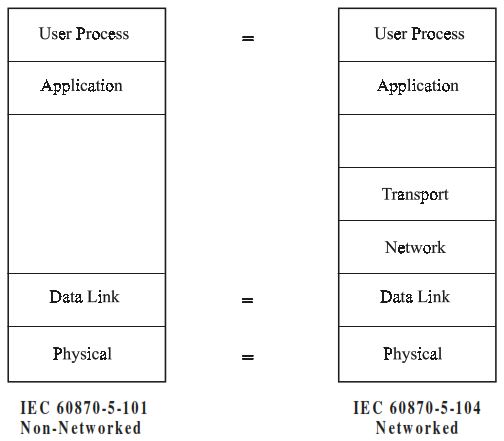
Architectures for IEC 101 and IEC 104
| Standard | Physical Layer | Link Layer | Transport |
|---|---|---|---|
| IEC 60870-5-101 | Serial (RS-232/485) | FT1.2 (custom) | None (direct) |
| IEC 60870-5-104 | Ethernet | TCP/IP | Standard Internet Protocol Stack |

Standards selections for IEC 60870-5-104
IEC 104 Communication Stack Over Ethernet
IEC 104 maps its protocol stack directly onto the OSI model, using standard network components:
| OSI Layer | Protocol Used in IEC 104 | Function |
|---|---|---|
| Application | IEC 60870-5-104 ASDU | Data objects, commands, status info |
| Transport | TCP (RFC 793) | Reliable, ordered data delivery |
| Network | IP (RFC 791) | Routing between networks |
| Data Link | Ethernet (IEEE 802.3) | Physical media transmission |
| Physical | Copper/Fiber/Wireless | Physical connection medium |
Data Transmission — APDU, APCI, and ASDU
IEC 104 data travels inside Application Protocol Data Units (APDUs), which contain:
- APCI (Application Protocol Control Information) — 4 bytes of control header.
- ASDU (Application Service Data Unit) — the actual telemetry data (process values, commands, timestamps, etc.).

Application Protocol Data Unit
Example Structure:
| Field | Description |
|---|---|
| Start (0x68) | Fixed start byte |
| Length | Number of following bytes |
| Control Field | 4 bytes — sequence numbers, frame type |
| ASDU | Data object (Type ID, Cause of Transmission, Address, IOA, etc.) |
APDUs are transmitted as TCP segments within Ethernet frames, ensuring reliable and ordered delivery.
Frame Flow Over Ethernet
A typical IEC 104 message exchange over Ethernet:

Start Data Transfer Procedure
- TCP Connection Establishment
- The controlling station (master) initiates a TCP session to port 2404 of the controlled station (slave).
- Acknowledged via the standard TCP 3-way handshake.
- IEC 104 Session Initialization
- Master sends Start Data Transfer (U-frame) →
STARTDT ACT - Slave responds with
STARTDT CON
- Master sends Start Data Transfer (U-frame) →
- Data Transmission
- I-format frames carry ASDU payloads.
- S-format frames acknowledge receipt.
- U-format frames handle control (Start/Stop/Test).
- Keep-Alive & Supervision
- Timers t1–t3 supervise communication.
- Idle connections send
TESTFR ACT/CONmessages.
- Disconnection
- Session ends with TCP FIN/ACK or timeout (t1 or t3 expiry).
Example: IEC 104 Over Ethernet in a Power Substation
Scenario
A utility SCADA master communicates with 10 RTUs distributed across substations over fiber Ethernet.
Flow
- Each RTU listens on TCP port 2404.
- The master opens simultaneous TCP connections.
- Real-time analog and binary data (ASDUs) are sent every few seconds.
- Events are timestamped using CP56Time2a and delivered immediately.
- Supervisory messages maintain connection health (t0–t3 timers).
This Ethernet-based approach supports millisecond-level data updates, redundant links, and diagnostic visibility using common IT tools (ping, Wireshark, SNMP).
Security and Reliability Over Ethernet
While Ethernet and TCP/IP improve performance, they also expose IEC 104 to cyber threats.
Therefore, secure deployment requires:
- Network segmentation — isolate SCADA VLANs.
- Encryption (IEC 62351-5 or TLS-104) — secure IEC 104 sessions.
- Firewall rules — restrict traffic to TCP port 2404 only.
- Monitoring — use DPI or protocol analyzers for anomaly detection.
Adopting a Zero-Trust Architecture ensures that no device or network segment is automatically trusted — every IEC 104 session is verified and logged.
🧩 Read next: Zero-Trust Architecture for SCADA »
Monitoring and Diagnostics
Wireshark is the most common tool to inspect IEC 104 traffic over Ethernet.
Filter examples:
tcp.port == 2404→ All IEC 104 trafficiec104.asdu.typeid == 45→ Single-point informationiec104.apci.type == 3→ U-format control frames
Engineers can analyze:
- Sequence numbers
- ASDU type IDs
- Response times
- Missed acknowledgments (for tuning t1–t3 timers)
Advantages of IEC 104 Over Ethernet
- High speed — faster polling and response time
- Network flexibility — works over LAN, WAN, fiber, or VPN
- Interoperability — standardized TCP/IP implementation
- Scalability — supports hundreds of simultaneous RTU connections
- Easy monitoring — uses standard network diagnostic tools
- Future-ready — integrates easily with IEC 62351, 61850, and DNP3/IP
Next Step: Decode Real IEC 104 Ethernet Frames
Want to see how IEC 104 looks on the wire?
Use the IEC 60870-5-104 Frame Decoder to visualize APCI headers, ASDU data, and timestamps (CP56Time2a) from real Ethernet captures.