
Every Modbus TCP packet starts with 7 bytes called the MBAP header (Modbus Application Protocol header). Those 7 bytes are what turn Modbus from a serial protocol into a network protocol. Get them right and everything works. Get them wrong, and the server may ignore the request, close the connection, or return an exception.
This article decodes a real Modbus TCP packet byte by byte. You will see what each field means, why it exists, how to build one correctly, and what breaks when you get it wrong.
Table of Contents
What is an MBAP Header?
The MBAP header (Modbus Application Protocol header) is a 7-byte block at the start of every Modbus TCP packet. It carries the information needed to identify the message, frame it correctly on the TCP stream, and route it to the target device. After the MBAP header comes the PDU (Protocol Data Unit) — the actual Modbus command and data.
MBAP is the reason Modbus works over TCP. Modbus RTU uses byte-level framing (silent intervals) and a CRC for integrity. Neither works over TCP, which is a byte stream with no message boundaries. The MBAP header replaces those RTU mechanisms with fields that fit the network world: a Length field for framing, a Transaction ID for matching requests to responses, and a Unit ID for addressing.
MBAP Header Format
Here is the hex dump of a real Modbus TCP request. It reads 10 holding registers starting at address 100 from device 1:
00 01 00 00 00 06 01 03 00 64 00 0AThat is the whole request. Twelve bytes total. Here is how those bytes break down visually:
|<-------------- MBAP Header (7 bytes) --------------->|<---- PDU (5 bytes) ---->|

  00 01    00 00    00 06    01          03    00 64    00 0A
  ┬────    ┬────    ┬────    ┬─          ┬─    ┬────    ┬────
  │        │        │        │           │     │        │
  │        │        │        │           │     │        └── Quantity: 10
  │        │        │        │           │     └── Starting address: 100
  │        │        │        │           └── Function code: 03 (Read Holding Registers)
  │        │        │        └── Unit ID: 1
  │        │        └── Length: 6 bytes follow
  │        └── Protocol ID: 0 (always)
  └── Transaction ID: 1
Together, the MBAP header plus the PDU form a complete Modbus TCP message.
MBAP Header Structure and the ADU
A complete Modbus TCP message is called an Application Data Unit (ADU). The ADU has two parts:
- MBAP Header — 7 bytes (transport-specific)
- PDU — variable length (transport-independent)
Modbus TCP ADU
├── MBAP Header (7 bytes)
│   ├── Transaction ID (2 bytes)
│   ├── Protocol ID (2 bytes)
│   ├── Length (2 bytes)
│   └── Unit ID (1 byte)
└── PDU (1 to 253 bytes)
    ├── Function Code (1 byte)
    └── Data (variable)
You will see both “ADU” and “PDU” in Modbus documentation. ADU = the complete wire message. PDU = the command portion, which stays identical across Modbus RTU, ASCII, and TCP. Only the framing around the PDU changes between transports.
MBAP Header Fields
The 7-byte header breaks into 4 fields:
| Bytes | Field | Value in our packet | What it does |
|---|---|---|---|
| 1-2 | Transaction ID | 00 01 | Matches request to response |
| 3-4 | Protocol ID | 00 00 | Always zero for Modbus |
| 5-6 | Length | 00 06 | How many bytes follow |
| 7 | Unit ID | 01 | Which device on the bus |
All multi-byte fields use network byte order (big-endian), as defined by Internet protocol conventions. Most significant byte first. So 00 01 means the value 1, not 256.
Field 1: Transaction ID (bytes 1-2)
Two bytes. Set by the client. The server echoes them back unchanged.
In our packet: 00 01 — the client used transaction ID 1 for this request.
Why it exists
You can have many requests in flight at once on the same TCP connection. A client might send:
- Request 1: read holding registers 100-109
- Request 2: read holding registers 200-209
- Request 3: write coil 42
All three go out. The server processes them and sends three responses back. Without a way to match responses to requests, the client would not know which response answers which request.
The Transaction ID solves this. The client picks a unique number for each outstanding request. The server copies that number into its response. The client uses the number to match the response to the original request.
How the client picks values
Most clients use a monotonically increasing counter:
Request 1: Transaction ID = 0x0001
Request 2: Transaction ID = 0x0002
Request 3: Transaction ID = 0x0003
...
When the counter reaches 0xFFFF, it rolls over back to 0x0000 (or 0x0001, depending on the client).
Some clients use random values. Either approach works — the server does not care, as long as the client can match its own responses.
Common mistake
Some engineers assume the Transaction ID is meaningful to the server or that it identifies “the transaction” in some deep protocol sense. It does not. It is a client-side matching tag. The server treats it as opaque bytes to copy back.
Field 2: Protocol ID (bytes 3-4)
Two bytes. Always 00 00 (value zero) for standard Modbus.
In our packet: 00 00 — as expected.
Why it exists
The Protocol ID field was reserved for future Modbus-family protocols. In practice, no other protocol has ever used the MBAP header format seriously. Standard Modbus is 0x0000, and that is what you will see 100% of the time.
What if I see a non-zero Protocol ID?
You have a bug. Either:
- Bytes are shifted (you started reading in the wrong place)
- The device is broken or non-compliant
- You are reading a completely different protocol that happens to be on port 502
The Modbus Messaging Implementation Guide specifies Protocol ID = 0 for Modbus. Many servers reject non-zero values by dropping the request or closing the connection, although implementation behavior varies.
The one exception: Modbus TCP Security
Modbus TCP Security (TLS on TCP port 802) still uses Protocol ID = 0 inside the TLS tunnel. The security layer is added around the standard Modbus TCP frame, so the MBAP header format is identical. For details, see our Modbus TCP Security article.
Field 3: Length (bytes 5-6)
Two bytes. Number of bytes that follow, starting from the Unit ID.
In our packet: 00 06 — six bytes follow the Length field.
How to Calculate the MBAP Length Field
The Length field counts:
- The Unit ID (1 byte)
- The Function Code (1 byte)
- The Data (variable, depends on the function code)
It does NOT count:
- Transaction ID (2 bytes)
- Protocol ID (2 bytes)
- Length itself (2 bytes)
Look at our packet:
00 01 00 00 00 06 01 03 00 64 00 0A
              ^^^^^
              Length says 6 bytes follow

Bytes after Length:
01     — Unit ID
03     — Function Code
00 64  — Data (starting address 100)
00 0A  — Data (register count 10)

Total: 6 bytes ✓
The math works out.
The formula for any Modbus TCP request:
Length = 1 (Unit ID) + 1 (Function Code) + N (Data bytes)For a Read Holding Registers request, N is always 4 (2 bytes starting address + 2 bytes quantity), so the Length is always 6. For other function codes, N changes with the data.
Why it exists
TCP is a stream. Bytes arrive in whatever chunks the network delivers them. Without the Length field, the receiver would not know where one Modbus message ends and the next begins. See our Modbus TCP Port 502 article for more on how TCP handles Modbus traffic.
With the Length field, the receiver knows exactly how many more bytes to read for this message. Read exactly that many, then start looking for the next MBAP header.
Common bug: wrong length
If your Length field says 10 bytes follow but you only send 8, the server waits for the missing 2 bytes. Eventually it times out. Some servers close the connection. Some silently ignore the request. Either way, no response comes back and your client hangs.
The reverse (say 6 but send 10) makes the server process the first 6 as one message and then treat the remaining 4 as the start of the next message — which fails because those 4 bytes are not a valid MBAP header start.
An incorrect Length field prevents proper message framing and is one of the most common causes of Modbus TCP communication failures.
Field 4: Unit ID (byte 7)
One byte. Identifies which device the request is for.
In our packet: 01 — this request targets Unit ID 1.
The naming confusion
Different documents call this the same field by different names:
- Unit ID — the Modbus TCP name
- Slave ID — the traditional Modbus name (RTU/ASCII)
- Station address — Modicon-era terminology
- Server address — modern client-server terminology
They all mean the same thing: which device on the “bus” (physical or virtual) should process this request.
When Unit ID matters
Case 1: Direct Modbus TCP device. If you connect to a Modbus TCP device by its IP address, the Unit ID is usually ignored or must be set to a specific value the device documents. Common defaults: 0, 1, or 255. Read the manual.
Case 2: Modbus TCP gateway to RTU/ASCII. A gateway on IP address 192.168.1.100 fronts 20 RTU devices on an RS-485 bus. Each RTU device has its own slave ID (say, 1 through 20). The Unit ID field in your Modbus TCP request tells the gateway which RTU device to forward the request to. Unit ID 5 → gateway forwards to RTU slave 5. See our Modbus RTU vs Modbus TCP article for more on gateway behavior.
Case 3: Broadcast. In serial Modbus, address 0 is the broadcast address. In native Modbus TCP, broadcasts are generally not used because TCP is a point-to-point protocol. Some gateways interpret Unit ID 0 specially (forwarding to all serial devices behind the gateway), while many devices simply ignore it.
Values 248-255
The Modbus specification reserves Unit IDs 248-255 for future use. Values 1-247 are for regular devices. Value 0 has the broadcast history noted above. Some devices still use 248-255 in the wild — check the device documentation.
MBAP vs PDU
Understanding the split between MBAP and PDU is the key to understanding Modbus across all transports.
| Aspect | MBAP Header | PDU |
|---|---|---|
| Size | Always 7 bytes | 1 to 253 bytes |
| Position | First 7 bytes of ADU | After MBAP header |
| Transport-specific? | Yes — Modbus TCP only | No — identical across RTU/ASCII/TCP |
| Contents | Transaction ID, Protocol ID, Length, Unit ID | Function Code + Data |
| Purpose | Framing, addressing, request matching | The actual Modbus command |
The design goal: the PDU is the “portable” part of Modbus. Whether the transport is serial (RTU/ASCII) or network (TCP), the function code and its data mean the same thing. Only the framing around the PDU changes.
For the full function code catalog, see our Modbus Function Codes Explained article.
MBAP Header Example: Decoding the PDU
After the 7-byte MBAP header comes the PDU. In our packet, the PDU is:
03 00 64 00 0ABroken down:
| Byte | Value | Meaning |
|---|---|---|
| 1 | 03 | Function Code 03 (Read Holding Registers) |
| 2-3 | 00 64 | Starting address: 100 (decimal) |
| 4-5 | 00 0A | Quantity: 10 registers |
The same PDU would appear identically in a Modbus RTU frame — just with a slave address byte before it and a CRC after it, and with different framing rules on the wire.
MBAP vs RTU Frame
If you have worked with Modbus RTU, the MBAP header replaces several fields you know from RTU:
| RTU field | Modbus TCP equivalent |
|---|---|
| Address (1 byte) | Unit ID (byte 7 of MBAP) |
| CRC (2 bytes at end) | None — TCP provides integrity |
| Silent interval framing | Length field (bytes 5-6 of MBAP) |
| No transaction ID | Transaction ID (bytes 1-2 of MBAP) |
TCP provides checksum-based error detection and reliable retransmission, so Modbus TCP does not include the CRC used by Modbus RTU. The Length field handles framing (where one message ends and the next begins). The Transaction ID enables pipelined requests. And the Unit ID stays, though its role changes slightly (see Field 4 above).
MBAP is deliberately different from the RTU frame — it does not just wrap RTU in TCP. Attempting to add CRC or use silent intervals in Modbus TCP is a protocol violation.
Network byte order in MBAP
All multi-byte fields in MBAP use network byte order (big-endian): most significant byte first. This is the standard convention for Internet protocols.
Transaction ID 00 01 = value 1 (not 256) Transaction ID 01 00 = value 256 (not 1) Length 00 06 = value 6 Length 06 00 = value 1536 (which is way too big and would break things)
If your Modbus TCP requests fail and you have not seen this documented anywhere, check whether your client is sending little-endian byte order by accident. Every MBAP field must be big-endian.
Note: this refers only to the MBAP fields. Inside the PDU (the Modbus register data), byte order and word order have their own complications. See our Modbus Byte Order and Word Order article for the 32-bit value pain.
A complete response for comparison
Here is what the server sends back for our request:
00 01 00 00 00 17 01 03 14 xx xx xx xx xx xx xx xx xx xx xx xx xx xx xx xx xx xx xx xx xxThe MBAP header:
| Bytes | Field | Value | Meaning |
|---|---|---|---|
| 1-2 | Transaction ID | 00 01 | Echoed from the request |
| 3-4 | Protocol ID | 00 00 | Always zero |
| 5-6 | Length | 00 17 | 23 bytes follow (0x17 = 23) |
| 7 | Unit ID | 01 | Echoed from the request |
The PDU:
| Bytes | Field | Value | Meaning |
|---|---|---|---|
| 1 | Function Code | 03 | Read Holding Registers (echo) |
| 2 | Byte Count | 14 | 20 bytes of register data follow (0x14 = 20) |
| 3-22 | Register values | xx...xx | 10 registers × 2 bytes each = 20 bytes |
The 23 bytes in the Length field = 1 (Unit ID) + 1 (Function Code) + 1 (Byte Count) + 20 (register data) = 23. Math checks out.
Notice how the server echoes the Transaction ID (00 01) and Unit ID (01) from the request. That is how the client matches this response to its original request.
What an exception response looks like
If the server cannot process the request, it returns an exception. Same MBAP header format, but the PDU is different:
00 01 00 00 00 03 01 83 02Let us decode:
| Bytes | Field | Value | Meaning |
|---|---|---|---|
| 1-2 | Transaction ID | 00 01 | Echoed |
| 3-4 | Protocol ID | 00 00 | Always zero |
| 5-6 | Length | 00 03 | 3 bytes follow |
| 7 | Unit ID | 01 | Echoed |
| 8 | Function Code + 0x80 | 83 | Original code (0x03) + 0x80 = exception |
| 9 | Exception Code | 02 | Illegal Data Address |
The high bit of the Function Code is set (0x83 = 0x03 OR 0x80) to indicate an exception response. The next byte is the exception code — in this case, 0x02 (Illegal Data Address), meaning the client asked for a register range that does not exist on the server.
Maximum Modbus TCP frame size
Although the Length field is 16 bits (allowing values up to 65,535), the Modbus Application Protocol limits the PDU to 253 bytes. Therefore, a standard Modbus TCP ADU is limited to 260 bytes (7-byte MBAP + 253-byte PDU).
Most requests are far smaller. A typical read or write request is 12-13 bytes total. Even a maximum-quantity read of 125 registers only produces a 259-byte response frame.
If your implementation deals with frames larger than 260 bytes, either the device is using a proprietary extension or the framing is wrong.
Common MBAP mistakes
Real deployments hit these regularly:
Reusing Transaction IDs on the same connection. If you send two requests with the same Transaction ID and both are in flight, you cannot match the responses. Always use unique IDs for outstanding requests.
Sending little-endian bytes. Some client libraries have configurable byte order for the payload data but assume you know MBAP must be big-endian. If your MBAP fields are getting scrambled, check the byte order of every field.
Wrong Length calculation. Forgetting to include the Unit ID in the count. Or including the Length field itself. Both break the packet framing.
Wrong Unit ID assumption. Assuming Unit ID does not matter for direct Modbus TCP devices. Some devices require a specific Unit ID and silently drop requests with wrong values. Check the manual.
Ignoring the Transaction ID in responses. Not matching responses to requests by Transaction ID. Works fine when you have one request in flight, fails silently when you pipeline.
Assuming CRC. Adding a 2-byte CRC to the end of an MBAP frame. Some devices tolerate the extra bytes, some reject the frame entirely. TCP already provides integrity — no CRC needed.
Reading MBAP in Wireshark
Wireshark decodes MBAP automatically for TCP port 502 traffic. When you open a captured Modbus TCP packet in Wireshark, you see a “Modbus/TCP” section in the packet details showing:
- Transaction Identifier
- Protocol Identifier
- Length
- Unit Identifier
- Function Code
- Function-specific data fields
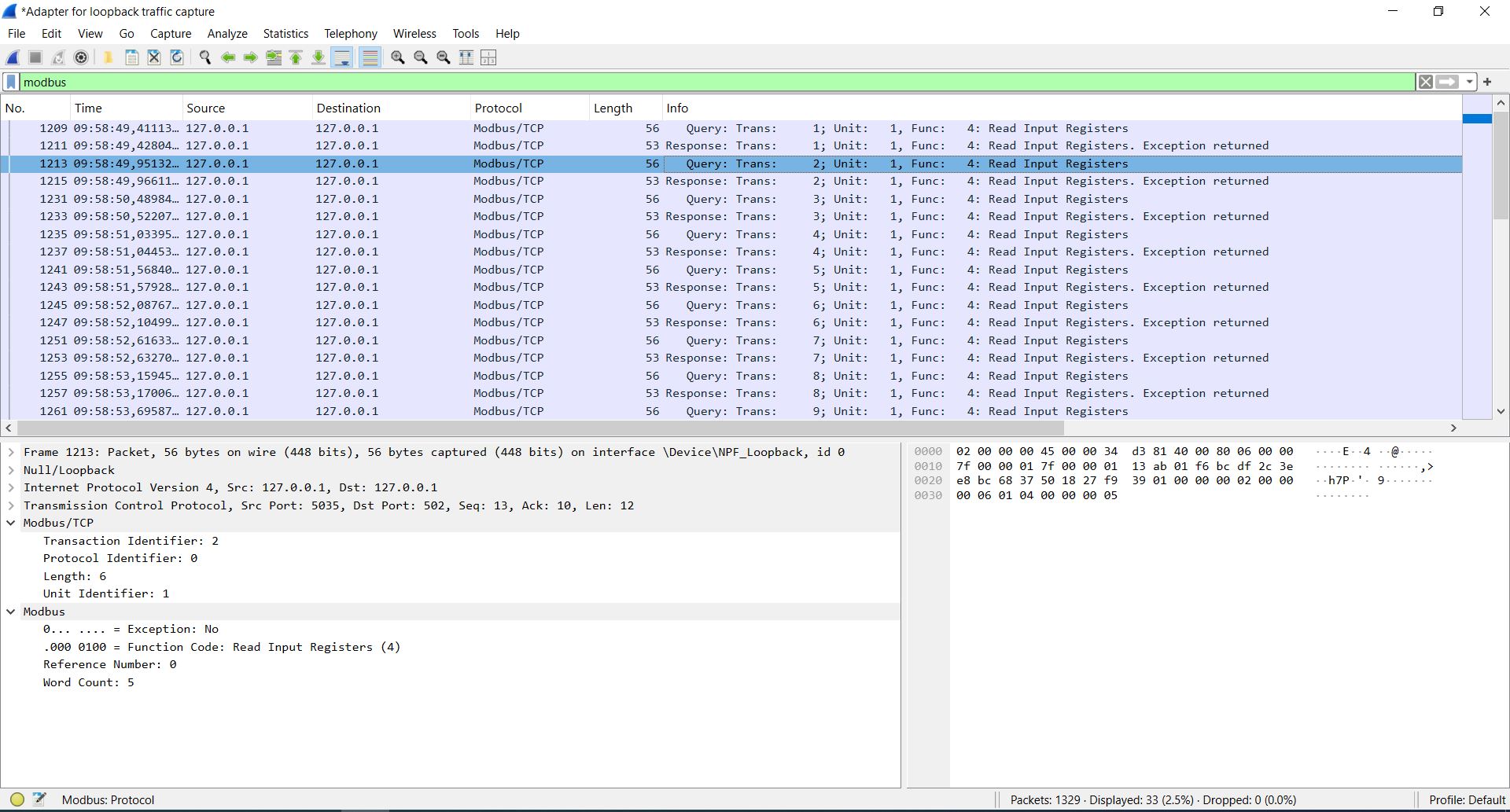
Useful filters:
modbus                      # All Modbus TCP traffic
mbtcp                       # Same, alternative filter name
mbtcp.trans_id == 0x0001    # Match a specific Transaction ID
mbtcp.unit_id == 5          # Traffic to/from a specific Unit ID
modbus.func_code == 3       # Read Holding Registers requests
If Wireshark does not decode Modbus TCP, either the traffic is not on TCP port 502, or the TCP stream has been re-segmented and Wireshark’s dissector cannot reassemble it. Enable “Allow subdissectors to reassemble TCP streams” in TCP preferences.
For deeper Wireshark work, see our Wireshark for Modbus TCP guide.
What is NOT in the MBAP header
Engineers sometimes ask about fields that do not exist in MBAP:
- Source address: Not in MBAP. The IP header handles source addressing.
- Sequence number: TCP handles sequencing at the transport layer.
- Authentication: MBAP has no authentication.
- Checksum/CRC: TCP provides integrity. No application-layer checksum.
- Timestamp: No timestamp in MBAP. Some servers add proprietary timestamps in the PDU data.
MBAP is deliberately minimal — 7 bytes to identify the transaction, protocol, length, and target device. Everything else is TCP’s job or the PDU’s job.
Common questions
What is the MBAP header in Modbus TCP?
The MBAP header is a 7-byte header at the start of every Modbus TCP packet. MBAP stands for Modbus Application Protocol. The 7 bytes contain four fields: Transaction ID (2 bytes for matching requests and responses), Protocol ID (2 bytes, always zero), Length (2 bytes indicating how many bytes follow), and Unit ID (1 byte identifying the target device). The MBAP header is what turns Modbus into a network protocol suitable for TCP transport.
What are the 7 bytes of the MBAP header?
Bytes 1-2 are the Transaction ID. Bytes 3-4 are the Protocol ID (always 0x0000). Bytes 5-6 are the Length field. Byte 7 is the Unit ID. All multi-byte fields are big-endian (network byte order, most significant byte first). After the 7-byte MBAP header comes the PDU (Protocol Data Unit), which is the actual Modbus command and data.
Does every Modbus TCP packet include an MBAP header?
Yes. Every Modbus TCP application data unit (ADU) begins with a 7-byte MBAP header. There are no exceptions — both requests and responses use the same MBAP structure. Even exception responses include the full 7-byte MBAP header before the exception PDU. If a packet on TCP port 502 does not start with a valid MBAP header, it is not conforming Modbus TCP.
What is an ADU in Modbus TCP?
An ADU (Application Data Unit) is a complete Modbus TCP message. It has two parts: the MBAP header (7 bytes) and the PDU (1 to 253 bytes). The ADU is what actually travels over the TCP connection. The maximum size of a Modbus TCP ADU is 260 bytes (7-byte MBAP + 253-byte PDU limit). Many readers search for “Modbus ADU” without realizing it is just the technical name for a complete Modbus TCP message.
Why is the Protocol ID always zero?
The Protocol ID field was reserved for future Modbus-family protocols. In practice, no other protocol has ever used the MBAP header format seriously. Standard Modbus is 0x0000 and that is what you will see 100% of the time. The Modbus Messaging Implementation Guide specifies Protocol ID = 0 for Modbus. Many servers reject non-zero values by dropping the request or closing the connection, although behavior varies.
How is the Length field calculated in MBAP?
The Length field counts the bytes that follow it, starting from the Unit ID. Specifically: Unit ID (1 byte) + Function Code (1 byte) + Data (variable). It does NOT include the Transaction ID, Protocol ID, or the Length field itself. For a Read Holding Registers request (function code 3) reading 10 registers, the Length is 6: Unit ID + Function Code + 2 bytes starting address + 2 bytes quantity.
What is the Transaction ID used for?
The Transaction ID lets a client match responses to its original requests when multiple requests are in flight on the same TCP connection. The client picks a unique ID (typically a monotonically increasing counter) for each request. The server copies the ID into its response. The client uses the ID to find which outstanding request the response answers. Without Transaction IDs, pipelined Modbus TCP would be impossible.
Can the Transaction ID wrap around after 65535?
Yes. The Transaction ID is a 16-bit field, so it can hold values from 0 to 65,535. When a client’s counter reaches 0xFFFF (65535), the next request wraps around to 0x0000 or 0x0001, depending on the client implementation. This is normal and expected. The only constraint is that a client should not reuse a Transaction ID while an earlier request with that ID is still outstanding — otherwise it cannot distinguish the responses.
What is the difference between Unit ID and Slave ID?
They are the same field with different names. Unit ID is the Modbus TCP terminology. Slave ID is the traditional Modbus RTU/ASCII name. Station address and server address are other names for the same thing. All refer to the 1-byte field identifying which device on the (physical or logical) bus should process the request.
Do I need to set Unit ID for direct Modbus TCP devices?
It depends on the device. Some direct Modbus TCP devices ignore the Unit ID (any value works). Some require a specific value like 0, 1, or 255. Always check the device manual. For Modbus TCP gateways that bridge to serial Modbus networks, the Unit ID must match the target slave’s address on the serial bus.
Is the MBAP header big-endian or little-endian?
Big-endian. Most significant byte first. This is standard network byte order. Transaction ID 1 is encoded as 00 01, not 01 00. Length 6 is encoded as 00 06, not 06 00. Every multi-byte field in the MBAP header is big-endian. If your Modbus TCP requests fail unexpectedly, check that your client is sending big-endian byte order for all MBAP fields.
Does Modbus TCP use a CRC like Modbus RTU?
No. Modbus TCP has no CRC. TCP provides checksum-based error detection and reliable retransmission, so an application-layer CRC would be redundant. Adding a 2-byte CRC to the end of an MBAP frame is a protocol violation. Some devices tolerate the extra bytes, some reject the frame. Do not add CRC to Modbus TCP frames.
Where does the Modbus PDU start?
The PDU starts at byte 8 — immediately after the 7-byte MBAP header. The PDU contains the function code (1 byte) followed by the data (variable length depending on the function code). The PDU is identical to what you see in Modbus RTU and Modbus ASCII, minus the address and CRC that those transports add. That is the design idea behind MBAP: the transport layer (MBAP) changes, but the application layer (PDU) stays the same across all Modbus variants.
Can Modbus TCP servers reject requests based on MBAP fields?
Yes. Servers can reject requests with non-zero Protocol ID, invalid Length values (mismatched with actual bytes received), or Unit IDs the server does not support. Behavior varies by implementation — some servers return exception codes, some close the connection, some drop the request silently. When a Modbus TCP request gets no response, the MBAP fields are the first thing to check.
What is the maximum Modbus TCP frame size?
Although the Length field is 16 bits, the Modbus Application Protocol limits the PDU to 253 bytes. Therefore, a standard Modbus TCP ADU is limited to 260 bytes (7-byte MBAP + 253-byte PDU). Most requests are far smaller — a typical read or write request is 12-13 bytes total. Even a maximum-quantity read of 125 registers produces only a 259-byte response frame.