
Every CIP I/O connection in the world starts with one service: Forward_Open. The PLC sends it to a remote drop, the drop validates it, and if everything checks out, the cyclic exchange begins. If something does not check out, the Forward_Open returns an error and the connection never opens — the device is invisible to the PLC until the cause is fixed.
Forward_Open is also the single most-Googled CIP service. “Forward_Open extended status 0x0106”, “ownership conflict CIP”, “RPI not supported”, “electronic keying mismatch” — every one of these queries lands on a Forward_Open failure. This article explains the service in depth: the full request structure, every important field, how the response works, what each error means, and how to read Forward_Open transactions in Wireshark.
For broader context on how CIP works, see our CIP Protocol Complete Guide.
Table of Contents
What Forward_Open is in one paragraph
Forward_Open is service code 0x54 of the Connection Manager Object (class 0x06), defined in ODVA’s CIP Networks Library Volume 1, Section 3-5.5.2. It establishes a CIP connection between an originator (typically a PLC) and a target (an I/O block, drive, sensor, etc.). The request carries every parameter needed to define the connection: which assemblies to use, how fast to update, how big each message is, what to do if a packet is missed, and electronic keying information that validates the target device matches the configuration. If the target accepts, it returns a Connection ID and the cyclic exchange starts. If not, it returns General Status 0x01 with an Extended Status code explaining what failed.
Service code, reply code, and the Large variant
| Service | Request code | Reply code | Max connection size |
|---|---|---|---|
| Forward_Open | 0x54 | 0xD4 | 511 bytes per direction |
| Large_Forward_Open | 0x5B | 0xDB | 65,535 bytes per direction |
| Forward_Close | 0x4E | 0xCE | (closes either) |
Forward_Open and Large_Forward_Open are functionally identical except for the size of the Network Connection Parameters field — Forward_Open uses a 16-bit WORD, Large_Forward_Open uses a 32-bit DWORD. The Large variant exists because modern PLCs exchange large structured data over single connections, and the 9-bit size field in standard Forward_Open caps at 511 bytes.
Reply codes follow the CIP convention of setting bit 7. Request 0x54 → reply 0xD4. Request 0x5B → reply 0xDB. When you see 0xD4 in Wireshark, you are looking at a Forward_Open reply.
Where Forward_Open lives in the protocol
Forward_Open is sent to the Connection Manager Object (class 0x06, instance 1) of the target device. Every CIP device that supports connections — meaning anything that exchanges I/O — implements this object and accepts Forward_Open at instance 1.
The path in a Forward_Open request typically looks like this:
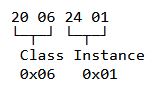
That two-segment EPATH says “send this to Class 0x06, Instance 1” — the Connection Manager. The Connection Manager then uses the Connection Path parameter inside the Forward_Open body to figure out which application object the connection should attach to (typically an Assembly object).
The Forward_Open request — complete structure
From Volume 1, Table 3-5.16, every Forward_Open request carries these fields in this order:
| Parameter | Type | Purpose |
|---|---|---|
| Priority/Time_tick | BYTE | Used with Time-out_ticks to compute the timeout for the request |
| Time-out_ticks | USINT | Number of timer ticks for this Forward_Open to time out |
| O→T Network Connection ID | UDINT | Originator’s chosen Connection ID for outgoing data |
| T→O Network Connection ID | UDINT | Originator’s chosen Connection ID for incoming data |
| Connection Serial Number | UINT | Originator-assigned unique number for this connection |
| Originator Vendor ID | UINT | The originator’s Vendor ID (assigned by ODVA) |
| Originator Serial Number | UDINT | The originator’s device serial number |
| Connection Timeout Multiplier | USINT | How many RPIs without packets before the connection dies |
| Reserved | 3 octets | Reserved — must be 0 |
| O→T RPI | UDINT | Originator-to-Target Requested Packet Interval, in microseconds |
| O→T Network Connection Parameters | WORD | Connection type, size, priority for O→T direction |
| T→O RPI | UDINT | Target-to-Originator RPI, in microseconds |
| T→O Network Connection Parameters | WORD | Connection type, size, priority for T→O direction |
| Transport Type/Trigger | BYTE | Transport class, production trigger, direction |
| Connection_Path_Size | USINT | Number of 16-bit words in the Connection_Path field |
| Connection_Path | Padded EPATH | Route + electronic keying + application object reference |
For Large_Forward_Open (service 0x5B), the two Network Connection Parameters fields become DWORD instead of WORD. Everything else is identical.
Let’s walk through the fields that matter most.
Network Connection ID — what gets assigned
The Connection IDs in the request are the originator’s preferences. The target responds with the IDs it actually assigns. In the simplest case the target accepts the originator’s values, but it can choose different ones — especially when multicast is involved.
After a successful Forward_Open, both sides know:
- O→T Connection ID — the ID the originator stamps onto outgoing data packets
- T→O Connection ID — the ID the target stamps onto outgoing data packets
These IDs go into the Sequenced Address Item of every UDP I/O packet on port 2222. When the PLC receives a UDP packet, it looks at the Connection ID to figure out which Forward_Open this packet belongs to and where to route the data internally. See our EtherNet/IP Encapsulation Protocol Explained article for more on how Connection IDs work on the wire.
Connection Serial Number, Vendor ID, Originator Serial Number — the unique trio
These three fields together uniquely identify a connection anywhere on a CIP network. A duplicate Forward_Open is defined as a new request whose vendor_ID, connection_serial_number, AND originator_serial_number match an existing connection’s parameters. If all three match an existing connection and the new request is not a “null Forward_Open” (used for reconfiguration), the target returns the famous General Status 0x01, Extended Status 0x0100 — “Connection in use or duplicate forward open.”
The Connection Serial Number is generated by the originator. ControlLogix PLCs and similar controllers increment it for every new Forward_Open they issue. The Vendor ID is assigned by ODVA and uniquely identifies the originator’s manufacturer. The Originator Serial Number is the originator’s own factory-set serial number.
This trio is how the protocol prevents two PLCs from accidentally sharing a connection or how it lets a PLC reuse the same Connection Serial Number to reconfigure an existing connection (via null Forward_Open).
RPI — Requested Packet Interval
The O→T RPI and T→O RPI fields specify the desired update rate in microseconds. Typical values:
| RPI value | Update rate | Typical use |
|---|---|---|
| 2,000 µs (2 ms) | 500 Hz | Motion control |
| 5,000 µs (5 ms) | 200 Hz | Fast I/O |
| 10,000 µs (10 ms) | 100 Hz | Standard I/O |
| 20,000 µs (20 ms) | 50 Hz | Slower I/O |
| 50,000 µs (50 ms) | 20 Hz | Diagnostics, slow loops |
| 100,000 µs (100 ms) | 10 Hz | Status, monitoring |
The two directions can have different RPIs — and often do. A drive might produce its position feedback at 2 ms but consume commands from the PLC at 20 ms because commands change less frequently than feedback. The originator picks the values; the target either accepts them or rejects with Extended Status 0x0111 (RPI not supported).
The target returns the Actual Packet Interval (API) in its reply. The API may be the same as the RPI or different — depending on what the target can actually deliver. Some targets round the RPI up to their nearest supported value.
Connection Timeout Multiplier
This is a USINT (1 byte) where each value represents a power-of-2 multiplier:
| Value | Multiplier |
|---|---|
| 0 | × 4 |
| 1 | × 8 |
| 2 | × 16 |
| 3 | × 32 |
| 4 | × 64 |
| 5 | × 128 |
| 6 | × 256 |
| 7 | × 512 |
The connection times out (and is declared dead) after RPI × Multiplier of silence. So an RPI of 10 ms with a multiplier of 4 (value 0) declares the connection dead after 40 ms without a packet. With a multiplier of 32 (value 3), it takes 320 ms.
Tight multipliers detect failures fast but cause nuisance trips on jittery networks. Loose multipliers tolerate jitter but delay fault detection. Default for most designs is 16 or 32.
Network Connection Parameters — the rich field
This 16-bit (32-bit for Large_Forward_Open) field packs several critical pieces of information together. From Volume 1 Table 3-5.8:
For Forward_Open (16-bit WORD):
| Bits | Field | Purpose |
|---|---|---|
| 15 | Redundant Owner | 0 = exclusive owner, 1 = multiple owners allowed |
| 14-13 | Connection Type | 00 = NULL, 01 = Multicast, 10 = Point-to-Point, 11 = Reserved |
| 12-11 | Priority | 00 = Low, 01 = High, 10 = Scheduled, 11 = Urgent |
| 10 | Fixed/Variable | 0 = Fixed size, 1 = Variable size |
| 9-0 | Connection Size | Connection data size in bytes (0-511) |
For Large_Forward_Open (32-bit DWORD), bits 31-17 are reserved, and the Connection Size field expands to 16 bits (supporting up to 65,535 bytes).
Critical bits to know
Connection Type (bits 14-13): Point-to-Point (10) means unicast — one specific originator, one specific target. Multicast (01) means the target produces data to a multicast group that any consumer can subscribe to. Multicast is what lets multiple PLCs read the same I/O data from one producer. NULL (00) is used for null Forward_Open (reconfiguration).
Priority (bits 12-11): Determines how the network treats this traffic. Scheduled gets the strictest determinism (and is usually used for ControlNet only). Urgent for time-critical. Low for everything else. Most EtherNet/IP I/O runs as Low or High.
Fixed/Variable (bit 10): Almost always 0 (fixed-size) for cyclic I/O — the connection data size is determined at connection establishment and stays constant. Variable-size is used for adaptive connections that can change size, which is uncommon.
Connection Size (bits 9-0): The data size in bytes, including any 32-bit run/idle header. This must match the actual assembly size on the target. Mismatches return Extended Status 0x0109 (Invalid connection size).
Transport Type/Trigger byte
This single byte controls how the transport layer behaves:
| Bits | Field | Values |
|---|---|---|
| 7 | Direction | 0 = Client, 1 = Server |
| 6-4 | Production Trigger | 000 = Cyclic, 001 = Change of State, 010 = Application Object Triggered |
| 3-0 | Transport Class | 0 = Class 0, 1 = Class 1, 2 = Class 2, 3 = Class 3 |
Transport classes
- Class 0 — Unidirectional, no acknowledgments. Used for cyclic I/O production from a single producer to a multicast group.
- Class 1 — Bidirectional, sequence-number-based reliability. The standard for unicast I/O connections between PLC and remote drop.
- Class 2 — Bidirectional with sequenced acknowledgments. Less common.
- Class 3 — Bidirectional with strict acknowledgments. Used for connected explicit messaging (a long-lived configuration session).
For typical EtherNet/IP I/O between a ControlLogix PLC and a Point I/O block, the Transport Type byte is usually 0x01 (Class 1, cyclic, client) for one direction and 0x83 (Class 1, cyclic, server) for the other.
Production triggers
- Cyclic — The producer sends data every RPI, period. Most common for I/O.
- Change of State — The producer sends data only when something changes, but at least once per RPI as a heartbeat. Used for low-traffic devices where most data is static.
- Application Object Triggered — The application explicitly tells the connection when to produce. Specialized use.
Connection Path — what the connection attaches to
The Connection Path is the part of the request that says “this connection is for these assemblies on this device.” It’s an EPATH (encoded path) that can contain several types of segments:
- Port Segments — for routing across multiple networks (e.g., from EtherNet/IP through a 1756-DNB scanner to a DeviceNet drop). Each port segment specifies one network hop.
- Electronic Keying Segment — the famous “this device must match these specs” check. Contains Vendor ID, Device Type, Product Code, and Revision. The target checks these against its own Identity Object and rejects the connection if they don’t match (with Extended Status 0x0114, 0x0115, or 0x0116 depending on which field failed).
- Logical Segments — pointing to the application objects. Typically Class 0x04 (Assembly), with three Instance IDs: one for the configuration assembly, one for the consumed (output) assembly, one for the produced (input) assembly.
- Data Segments — carrying configuration data inline with the Forward_Open request (used when the configuration assembly has data that should be applied at connection establishment).
A typical Connection Path for a Point I/O EtherNet/IP block looks something like:
Electronic Keying Segment (10 bytes)
  Vendor ID = 0x0001 (Rockwell)
  Device Type = 0x000C (Communications Adapter)
  Product Code = 0x00B8 (1734-AENT)
  Revision = 1.1
Logical Class Segment: 0x04 (Assembly)
Logical Instance Segment: 0x66 (Configuration Assembly)
Logical Instance Segment: 0x67 (Consumed Assembly)
Logical Instance Segment: 0x68 (Produced Assembly)
The exact assembly instance numbers vary by device — the EDS file documents them. See our reference articles on CIP Data Types and the upcoming Assembly Object article for more on assemblies.
The successful Forward_Open response
From Volume 1 Table 3-5.17, a successful response carries:
| Parameter | Type | Purpose |
|---|---|---|
| O→T Network Connection ID | UDINT | Target’s assigned ID for O→T direction (may echo originator’s choice) |
| T→O Network Connection ID | UDINT | Target’s assigned ID for T→O direction |
| Connection Serial Number | UINT | Echoes the request’s value |
| Originator Vendor ID | UINT | Echoes the request’s value |
| Originator Serial Number | UDINT | Echoes the request’s value |
| O→T API | UDINT | Actual packet interval for O→T (may differ from RPI) |
| T→O API | UDINT | Actual packet interval for T→O |
| Application Reply Size | USINT | Number of 16-bit words in the Application Reply field |
| Reserved | USINT | Reserved |
| Application Reply | Array of byte | Application-specific data |
The Reply Service code is 0xD4 (0x54 with bit 7 set). General Status is 0x00. The Connection IDs returned are what the originator should use for all subsequent data on this connection.
After this reply, the spec requires the target to wait at least 10 seconds for the first data packet on the connection. This gives the originator a generous window to set up its end of the connection before timing out.
The failed Forward_Open response
When Forward_Open fails, the response carries General Status 0x01 and an Extended Status that explains the actual reason. The Extended Status is a 16-bit value — the “object specific status word” in spec language.
The most common Extended Status values for Forward_Open failures (Volume 1 Section 3-5.6):
| Extended Status | Reason | What it usually means |
|---|---|---|
| 0x0100 | Connection in use or duplicate forward open | Same vendor_ID + connection_serial_number + originator_serial_number combination already has an active connection |
| 0x0103 | Transport class and trigger combination not supported | Wrong transport class for this object |
| 0x0106 | Ownership conflict | Another scanner already owns this connection |
| 0x0107 | Target connection not found (Forward_Close-only typically) | Connection ID doesn’t exist on target |
| 0x0108 | Invalid network connection parameter | Connection parameters malformed |
| 0x0109 | Invalid connection size | Data size doesn’t match assembly instance |
| 0x0110 | Target for connection not configured | Target object exists but isn’t ready for connection |
| 0x0111 | RPI not supported | Update rate outside target’s supported range |
| 0x0113 | Out of connections | Target has no available connection resources |
| 0x0114 | Vendor ID or product code mismatch | Electronic keying failed |
| 0x0115 | Device type mismatch | Electronic keying failed |
| 0x0116 | Revision mismatch | Electronic keying failed |
| 0x0117 | Invalid produced or consumed application path | Assembly instance ID doesn’t exist on the device |
| 0x0118 | Invalid or inconsistent configuration application path | Configuration assembly mismatch |
| 0x0119 | Non-listen-only connection not opened | Listen-only Forward_Open without primary connection |
| 0x011A | Target object out of connections | Specific object instance is out of connections |
| 0x011B | RPI is smaller than the production inhibit time | RPI conflicts with the producer’s inhibit time |
For a complete walkthrough of these codes and the broader CIP General Status structure, see our CIP General Status Codes Reference.
The failure response also carries the remaining_path_size, which can help diagnose routing failures across multi-network paths — it tells you how far the Forward_Open made it before failing.
Null Forward_Open — used for reconfiguration
A null Forward_Open is a Forward_Open where both Connection Type bits in both Network Connection Parameter fields are set to NULL (0). When the target sees a null Forward_Open with the same vendor_ID + connection_serial_number + originator_serial_number as an existing connection, it does NOT treat it as a duplicate. Instead, it forwards the request to the application for reconfiguration.
This mechanism lets the originator change connection parameters without first closing the connection. The application decides which parameters can actually be modified and which must be left alone.
Most engineers never see null Forward_Open directly — engineering tools issue it transparently when you change a configuration parameter on a running connection.
The connection lifecycle
A typical CIP connection lifecycle:
- Forward_Open (0x54) issued by originator → target
- Forward_Open reply (0xD4) with assigned Connection IDs from target → originator
- Cyclic data exchange at the negotiated APIs (Class 0/1 packets on UDP port 2222 in EtherNet/IP)
- Forward_Close (0x4E) at the end of the session → connection torn down cleanly OR
- Timeout — RPI × Multiplier elapses without a packet → connection declared dead automatically
The timeout path is automatic — if a network failure prevents packets from flowing, the connection dies on its own and both sides clean up. The Forward_Close path is the polite way to end a connection, freeing target resources immediately rather than waiting for the timeout.
Practical example — a PLC opening a Class 1 connection
Imagine a 1756-L73 ControlLogix PLC opening a connection to a 1734-AENT Point I/O adapter with two input modules at slots 1 and 2.
The Forward_Open request might look like:
Service: 0x54 (Forward_Open)
Request Path: 20 06 24 01  (Class 0x06, Instance 1 - Connection Manager)

Forward_Open Parameters:
  Priority/Time_tick:                0x07
  Time-out_ticks:                    0xC9 (201 ticks)
  O→T Connection ID:                 0x80012345  (chosen by originator)
  T→O Connection ID:                 0x80012346
  Connection Serial Number:          0x0042
  Originator Vendor ID:              0x0001  (Rockwell)
  Originator Serial Number:          0x12345678  (PLC's serial number)
  Connection Timeout Multiplier:     0x02  (×16)
  Reserved:                          00 00 00
  O→T RPI:                           0x0001E848  (125,000 µs = 125 ms)
  O→T Network Connection Parameters: 0x43F8  (Point-to-point, Low priority, fixed size, 8 bytes)
  T→O RPI:                           0x0001E848  (125 ms)
  T→O Network Connection Parameters: 0x43F8
  Transport Type/Trigger:            0x01  (Class 1, cyclic, client)
  Connection_Path_Size:              0x0A  (10 words = 20 bytes)
  Connection_Path:
    Electronic Keying Segment:       Vendor=1, Type=0x0C, Product=0xB8, Rev=4.1
    Class 0x04 (Assembly):           20 04
    Configuration Assembly Inst 102: 24 66
    Consumed Assembly Inst 103:      2C 67
    Produced Assembly Inst 104:      2C 68
The 1734-AENT validates everything, allocates a connection, and responds:
Service: 0xD4 (Forward_Open reply)
General Status: 0x00 (Success)

Response Parameters:
  O→T Connection ID:                 0x80012345  (echoed)
  T→O Connection ID:                 0xABCDEF01  (target-assigned for multicast)
  Connection Serial Number:          0x0042  (echoed)
  Originator Vendor ID:              0x0001  (echoed)
  Originator Serial Number:          0x12345678  (echoed)
  O→T API:                           0x0001E848  (125 ms — accepted as requested)
  T→O API:                           0x0001E848
  Application Reply Size:            0x00
The connection is now open. The PLC produces output data every 125 ms tagged with Connection ID 0x80012345. The 1734-AENT produces input data tagged with 0xABCDEF01. Both flow over UDP port 2222.
Reading Forward_Open in Wireshark
Wireshark’s CIP dissector decodes Forward_Open requests and replies natively. Useful filters:
cip                                       # All CIP traffic
cip.service == 0x54                       # Forward_Open requests
cip.service == 0xD4                       # Forward_Open replies
cip.service == 0x5B                       # Large_Forward_Open requests
cip.service == 0xDB                       # Large_Forward_Open replies
cip.service == 0x4E                       # Forward_Close
cip.genstat == 0x01                       # All CIP failures (includes failed Forward_Opens)
cip.cm.ext.code != 0                      # Frames with non-zero Connection Manager Extended Status
A productive diagnostic workflow:
- Start a capture before the failure begins (or use continuous capture)
- Apply
cip.service == 0x54to see every Forward_Open attempt - For each one, look at the matching
cip.service == 0xD4reply - If General Status is non-zero, expand the reply to find the Extended Status code
- Match the Extended Status against the table above
For broader EtherNet/IP capture workflows, see our Wireshark for EtherNet/IP guide.
Troubleshooting checklist
When a Forward_Open fails, walk this list:
- Is the device reachable? Ping the IP. If ping fails, the network is broken — not a CIP problem.
- Can you read the Identity Object? Try a simple Get_Attribute_Single on Class 0x01, Instance 1. If this fails, encapsulation or basic CIP is broken — fix that first.
- Read the Extended Status. Specific guidance per code:
- 0x0100: Wait or power-cycle the device — a stuck connection is holding the slot
- 0x0106: Another scanner owns the device — find and remove it, or use this scanner instead
- 0x0109: Connection size doesn’t match — check assembly sizes in the device’s EDS file
- 0x0111: RPI not in range — increase RPI to the device’s supported minimum
- 0x0113: Out of connections — close other connections or use a bigger device
- 0x0114-0x0116: Electronic keying — set keying to “Compatible Module” or update firmware revision in config
- 0x0117: Wrong assembly instance — verify against EDS
- Confirm the assembly instances and data sizes. Open the EDS file or device manual. Make sure the Configuration, Consumed, and Produced assembly instances in your configuration match what the device actually exposes.
- Try a known-good baseline. If you have an identical device running on a different PLC, compare the Forward_Open requests in Wireshark side by side. Whatever differs is your problem.
- Power-cycle the device. Genuinely resets all internal state including stuck connections and CFUNID locks.
Frequently asked questions
What is CIP Forward_Open?
Forward_Open is the CIP service used to establish a connection between an originator (typically a PLC) and a target device (I/O block, drive, etc.). It is service code 0x54 of the Connection Manager Object (class 0x06). Every cyclic I/O connection in CIP begins with a Forward_Open request.
What is the service code for Forward_Open?
The service code for Forward_Open is 0x54 (decimal 84) per ODVA’s CIP Networks Library Volume 1, Section 3-5.5.2 and Table 3-5.7. The reply service code is 0xD4 (0x54 with bit 7 set). The related Large_Forward_Open service uses code 0x5B (reply 0xDB) for connections exceeding 511 bytes.
What is the difference between Forward_Open and Large_Forward_Open?
Forward_Open (0x54) uses a 16-bit Network Connection Parameters field with a 9-bit size field — limiting connections to 511 bytes per direction. Large_Forward_Open (0x5B) uses 32-bit Network Connection Parameters with a 16-bit size field, supporting connections up to 65,535 bytes per direction. Modern PLCs exchanging large structured data over single I/O connections typically use Large_Forward_Open. Engineering tools select automatically based on the configured connection size.
What does Extended Status 0x0106 mean?
Extended Status 0x0106 means “Ownership conflict” — another scanner already owns the connection to this device. CIP allows only one exclusive-owner scanner per non-redundant device. To fix: either remove the other scanner’s configuration or use that scanner instead. If the conflict is stale (the original owner is no longer active), a device power-cycle clears it.
What does Extended Status 0x0111 mean?
Extended Status 0x0111 means “RPI not supported” — the Requested Packet Interval is outside the device’s supported range. Either too fast (the device can’t keep up) or too slow (the device doesn’t support intervals that long). Check the EDS file or device manual for the supported RPI range and adjust your configuration.
What does Extended Status 0x0114 mean?
Extended Status 0x0114 means “Vendor ID or Product Code mismatch” — electronic keying failed because the Vendor ID or Product Code in your configuration doesn’t match the actual device. Either swap to the correct device, update your configuration to match, or change the keying mode to “Compatible Module” or “Disable Keying” in your engineering tool.
What is RPI in Forward_Open?
RPI stands for Requested Packet Interval — the desired update rate of the cyclic data exchange, in microseconds. The Forward_Open request includes separate O→T RPI and T→O RPI fields because the two directions can update at different rates. The target either accepts the requested RPI or rejects with Extended Status 0x0111. The target’s reply includes the API (Actual Packet Interval), which may differ from the RPI if the target had to round to a supported value.
What is electronic keying in Forward_Open?
Electronic keying is the mechanism in Forward_Open that validates the device matches the configuration. The Connection Path includes a key segment with Vendor ID, Device Type, Product Code, and Revision. The target checks these against its own Identity Object and rejects the connection if they don’t match — returning General Status 0x01 with Extended Status 0x0114, 0x0115, or 0x0116 depending on which check failed. Engineering tools usually let you choose strict, “Compatible Module,” or “Disable Keying.”
What is the Connection Timeout Multiplier?
The Connection Timeout Multiplier is a value (0-7) that maps to a power-of-2 multiplier (4, 8, 16, 32, 64, 128, 256, 512). The connection is declared dead after RPI × Multiplier of silence. So an RPI of 10 ms with multiplier value 2 (×16) declares the connection dead after 160 ms without a packet. Tight multipliers detect failures fast but cause nuisance trips on jittery networks; loose multipliers tolerate jitter but delay fault detection.
What is a null Forward_Open?
A null Forward_Open is a Forward_Open where both Connection Type bits are set to NULL (00) in both the O→T and T→O Network Connection Parameters. The target uses null Forward_Open for connection reconfiguration — when the same vendor_ID + connection_serial_number + originator_serial_number combination appears, the target does not treat it as a duplicate but forwards it to the application for parameter updates. Engineering tools issue null Forward_Open transparently when you modify a parameter on a running connection.
How do I troubleshoot a Forward_Open failure?
Read both General Status (almost always 0x01) and Extended Status. The Extended Status is where the actual reason lives. Common causes: ownership conflict (0x0106), RPI not supported (0x0111), out of connections (0x0113), electronic keying mismatch (0x0114-0x0116), wrong assembly size (0x0109), or wrong assembly instance (0x0117). Use Wireshark to capture the request and reply, then match the Extended Status code against the reference table. Power-cycling the device often clears stuck states.
What port does Forward_Open use?
Forward_Open is sent over TCP port 44818 as encapsulated CIP traffic. The EtherNet/IP encapsulation header wraps a SendRRData command (0x006F) carrying the Forward_Open service request. The resulting connection then exchanges I/O data over UDP port 2222 using the Connection IDs assigned in the Forward_Open reply. See our CIP Protocol Ports article for details.